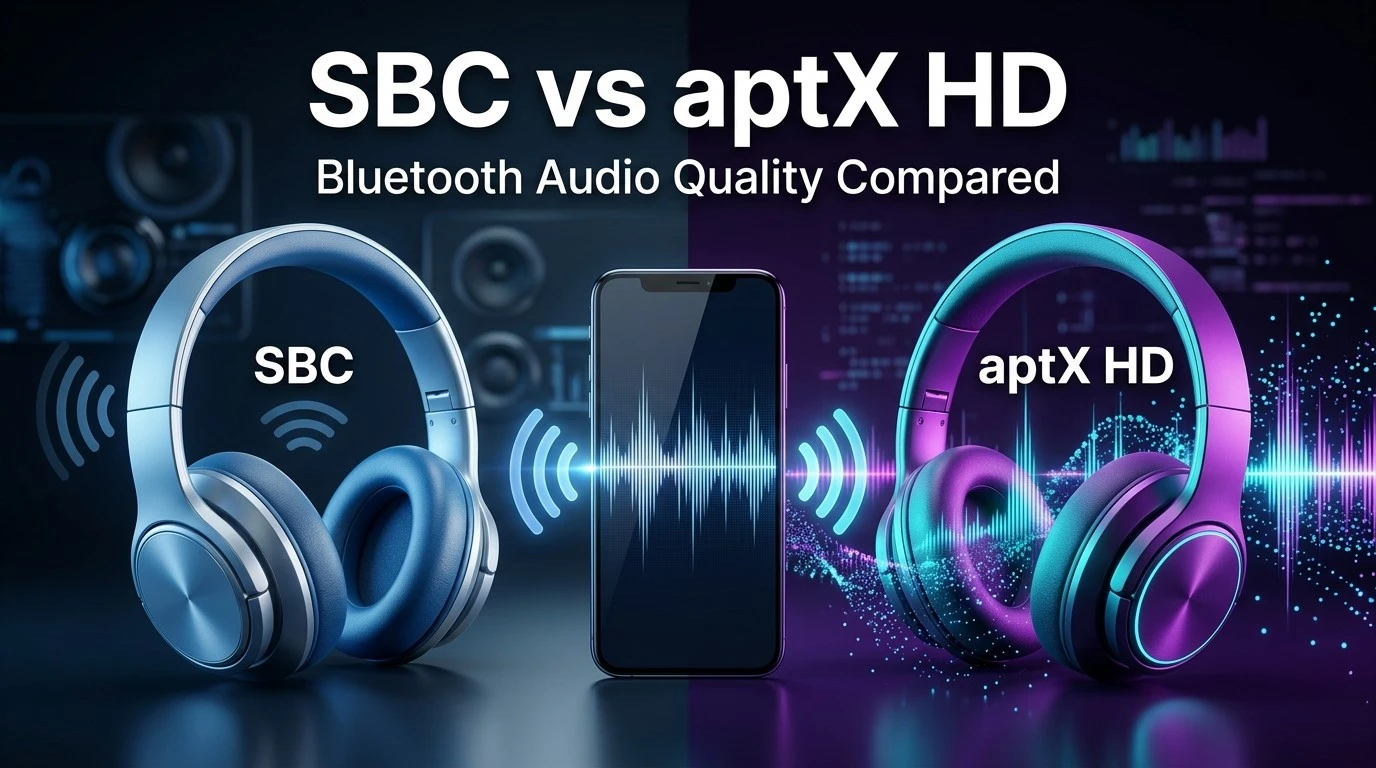
When comparing SBC vs aptX HD, the biggest question is whether upgrading to a more advanced Bluetooth audio codec will actually improve your listening experience. SBC is the standard Bluetooth audio codec supported by virtually every device that plays Bluetooth audio, making it a reliable choice for everyday music listening, videos, podcasts, and wireless headphones. aptX HD, on the other hand, is designed to deliver higher-resolution audio transmission over compatible Bluetooth connections, potentially preserving more detail and clarity in your favorite songs.
However, a higher bitrate or a more advanced codec does not automatically guarantee better sound. Your headphones, smartphone, music quality, Bluetooth connection, and personal listening preferences all influence the final result. Compatibility also matters because both your audio source and your headphones must support aptX HD to use it.
In this guide, we will compare SBC and aptX HD across sound quality, bitrate, latency, compatibility, stability, and practical performance. By the end, you will understand which codec makes the most sense for your headphones, smartphone, and listening habits.
Feature-by-Feature Comparison Table
Before choosing between SBC and aptX HD, it helps to understand how these codecs differ in their technical design and real-world applications. The following table summarizes their most important characteristics.
| Feature | SBC | aptX HD |
|---|---|---|
| Full name | Subband Codec | Qualcomm aptX HD |
| Primary purpose | Standard Bluetooth audio transmission | Higher-quality Bluetooth audio transmission |
| Bluetooth status | Mandatory baseline codec for A2DP implementations | Optional codec requiring compatible devices |
| Maximum advertised bitrate | Commonly up to approximately 328 kbps in typical implementations | Up to 576 kbps |
| Audio processing | Lossy compression | Lossy compression |
| Advertised audio capability | Depends on implementation and settings | Supports audio up to 24-bit/48 kHz input |
| Sound quality | Good with a suitable implementation | Potentially better detail and fidelity |
| High-resolution audio | Does not preserve all original source information | Designed to transmit higher-resolution audio with lossy compression |
| Latency | Varies by implementation and buffer settings | Varies by implementation and buffer settings |
| Device compatibility | Extremely broad | Limited to devices explicitly supporting aptX HD |
| Headphone requirements | Supported by virtually all standard Bluetooth audio devices | Both transmitting and receiving devices need aptX HD support |
| Music streaming | Suitable for all major streaming services | Useful with high-quality sources and compatible equipment |
| Gaming | Usable, but latency may be noticeable | Not a guaranteed low-latency gaming solution |
| Video playback | Generally suitable with synchronization support | Can be suitable, depending on device buffering |
| Connection stability | Depends on Bluetooth conditions and implementation | Depends on Bluetooth conditions and implementation |
| Battery consumption | Depends on codec implementation and hardware | Depends on codec implementation and hardware |
| Best for | Everyday listening and broad compatibility | Quality-focused listening with compatible devices |
The most important distinction is that SBC prioritizes universal baseline support, whereas aptX HD offers a higher-bitrate encoding option for compatible equipment. Neither codec can overcome limitations caused by poor headphones, weak source material, or an unstable wireless connection.
Quick Highlights Table
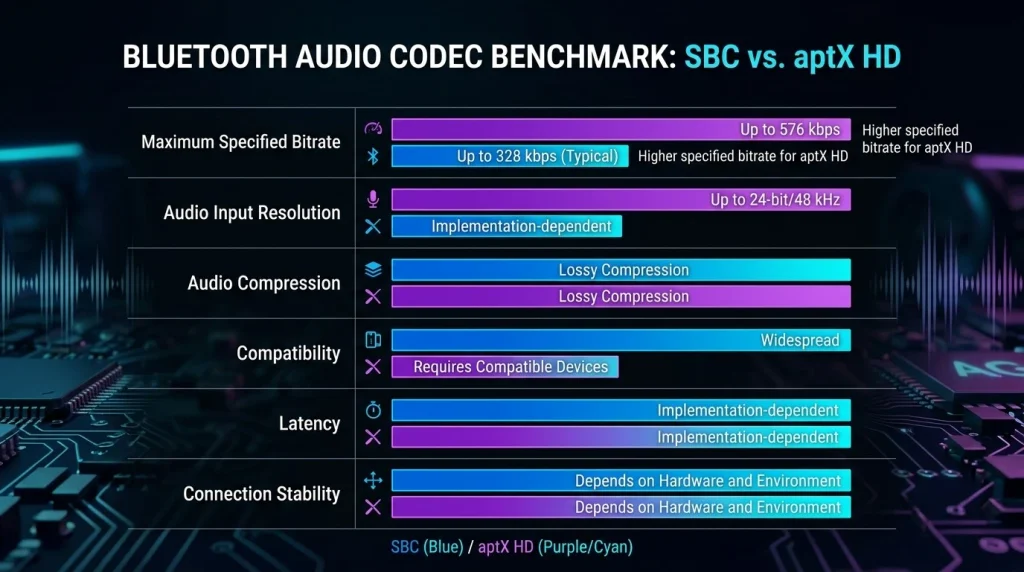
If you want the main differences without examining every technical detail, these highlights provide a quick overview of what matters most when deciding between SBC and aptX HD.
| Category | Better Choice | Why |
|---|---|---|
| Universal compatibility | SBC | Broad support across Bluetooth audio devices |
| Higher available bitrate | aptX HD | Supports transmission at up to 576 kbps |
| Potential audio detail | aptX HD | Designed for higher-quality audio transmission |
| Basic everyday listening | SBC | Works with a wide range of devices |
| High-quality wireless music | aptX HD | Can preserve more audible detail in suitable setups |
| Gaming latency | Neither by default | Both depend on implementation and buffering |
| Older or budget devices | SBC | More likely to be supported |
| Compatible premium headphones | aptX HD | Offers a higher-quality transmission option |
| Connection reliability | Neither universally | Depends on interference, hardware, and implementation |
| Best overall compatibility | SBC | Does not require optional codec support |
Quick takeaway: aptX HD is the more attractive option for quality-focused listeners who own compatible devices. SBC remains a dependable choice when compatibility and convenience are the main priorities.
Understanding SBC and aptX HD
To understand the difference between these two codecs, it helps to know what a Bluetooth audio codec actually does.
A codec encodes digital audio into a format that can be transmitted wirelessly and then decodes it at the receiving device. Bluetooth has limited bandwidth compared with an uncompressed audio signal, so codecs use compression to make wireless audio transmission practical.
What Is SBC?
SBC stands for Subband Codec. It is the baseline audio codec used with the Bluetooth Advanced Audio Distribution Profile (A2DP), which supports wireless stereo audio streaming.
SBC is designed to balance audio quality, processing requirements, and compatibility. It can operate across a wide range of Bluetooth headphones, earbuds, speakers, smartphones, computers, and other compatible audio devices.
Its main advantage is simplicity and widespread support. You generally do not need to check whether two Bluetooth audio devices support a particular optional codec before using SBC.
However, SBC uses lossy compression. Some information from the original audio may be discarded during encoding, and the resulting quality depends on the bitrate, encoder implementation, and other settings.
Key benefits of SBC:
- Broad compatibility with Bluetooth audio equipment.
- Good performance for music, podcasts, and everyday listening.
- No need for specialized codec support.
- Generally modest processing requirements.
- A practical fallback when two devices do not share a more advanced codec.
Main limitations of SBC:
- Audio quality can vary depending on the implementation.
- It may preserve less detail than a well-implemented higher-bitrate alternative.
- Wireless latency can be noticeable in some setups.
- It does not guarantee a particular high-quality listening experience simply because a device supports Bluetooth.
For most casual listeners, SBC remains a perfectly usable option. Its performance should not be judged solely by its age or its reputation as the default codec.
What Is aptX HD?
aptX HD is a Bluetooth audio codec developed by Qualcomm. It is designed to deliver higher-quality wireless audio by using a different compression approach from SBC.
Qualcomm specifies aptX HD for audio input up to 24-bit/48 kHz and a bitrate of up to 576 kbps. It aims to reduce audible distortion and preserve more detail during wireless transmission.
The 24-bit specification is particularly relevant to people who listen to high-quality music files or lossless streaming sources. It allows the codec to accept higher-resolution audio input before compression.
However, aptX HD is still a lossy codec. It does not transmit every bit of an original lossless audio file unchanged, and a 24-bit input does not guarantee that every listener will hear an improvement over SBC.
Another important consideration is compatibility. Both the transmitting device and the receiving device must support aptX HD. If they do not share this codec, the Bluetooth connection will use another mutually supported option, potentially SBC.
Key benefits of aptX HD:
- Supports audio input up to 24-bit/48 kHz.
- Offers a higher specified bitrate than typical SBC implementations.
- Is designed to improve fidelity during Bluetooth transmission.
- Can be a good choice for quality-focused music listening.
- Is supported by a range of compatible Android devices, headphones, and wireless speakers.
Main limitations of aptX HD:
- It requires compatible hardware at both ends.
- It does not provide lossless audio transmission.
- Its sound-quality advantage depends on the entire audio system.
- It is not specifically designed to guarantee ultra-low latency for gaming.
- A higher bitrate does not automatically mean a clearly audible improvement.
In short, aptX HD is aimed at listeners who want a higher-quality Bluetooth audio option and have equipment that supports it.
Sound Quality: Which Codec Sounds Better?
Sound quality is the most important part of the SBC vs aptX HD comparison. While technical specifications help explain how the codecs work, your actual listening experience is what ultimately matters.
SBC Sound Quality
SBC can sound surprisingly good when implemented properly. For everyday listening, it can deliver clear vocals, enjoyable bass, and a balanced presentation across many types of music.
Its performance depends partly on the encoder settings selected by the transmitting device. A well-configured SBC connection may sound better than some listeners expect, particularly when paired with headphones that have good drivers and effective digital signal processing.
For example, listening to podcasts, pop music, acoustic recordings, or ordinary streaming audio over SBC can provide a satisfying experience. Many people may not notice a consistent difference between SBC and a higher-quality codec in a casual listening environment.
Nevertheless, SBC’s lossy compression can introduce audible differences in some circumstances. These may be more noticeable in complex musical passages, quiet background details, or recordings with subtle high-frequency information.
aptX HD Sound Quality
aptX HD is designed to maintain higher audio fidelity during wireless transmission. Its higher bitrate and 24-bit input support make it appealing for listeners who prioritize music quality.
With suitable headphones and a compatible source, aptX HD may provide a cleaner representation of complex musical passages and subtle recording details. It can be particularly appealing when listening to high-quality recordings in a quiet environment.
However, the improvement is not guaranteed. Headphone tuning, frequency response, distortion, fit, and noise isolation often have a much greater effect on perceived sound quality than the codec alone.
For instance, an inexpensive pair of headphones using aptX HD may still sound worse than a well-designed pair using SBC. Similarly, a heavily compressed music stream may not reveal much difference between the two codecs.
Which Sounds Better in Real-World Listening?
The practical winner is aptX HD for its higher-quality transmission design, provided both devices support it and the rest of the audio chain can benefit from it.
SBC remains competitive for everyday listening, and the audible difference may be small or difficult to identify in some systems.
A useful comparison is to listen to the same recording through the same headphones, at matched volume levels, while switching between codecs. Avoid changing equalizer settings or other audio enhancements during the test.
This approach makes it easier to determine whether the difference matters to your ears instead of relying entirely on specifications.
Bitrate and Audio Resolution
Bitrate is one of the clearest measurable differences between SBC and aptX HD.
Bitrate describes how much encoded audio data is transmitted per second. It is usually expressed in kilobits per second (kbps). A higher bitrate can allow a codec to preserve more audio information, but the compression algorithm and implementation also matter.
| Specification | SBC | aptX HD |
|---|---|---|
| Typical maximum bitrate | Approximately 328 kbps in common implementations | Up to 576 kbps |
| Supported input resolution | Depends on implementation; commonly used with standard Bluetooth audio formats | Up to 24-bit/48 kHz |
| Compression | Lossy | Lossy |
| Original audio preserved perfectly? | No | No |
| Higher-bitrate design | Standard baseline implementation | Yes |
These figures are useful reference points rather than guarantees for every device. Actual SBC bitrates can vary, and the maximum specified bitrate is not necessarily the bitrate used during every connection. aptX HD’s advertised capabilities likewise depend on compatible hardware.
It is also important to distinguish bitrate from bit depth and sample rate. Bitrate describes the amount of encoded data transmitted each second. Bit depth relates to the precision used to represent digital audio samples, while sample rate indicates how many samples are taken per second.
aptX HD’s 24-bit/48 kHz capability does not mean it transmits uncompressed 24-bit/48 kHz audio. The signal is still compressed to fit the Bluetooth transmission.
Winner: aptX HD. Its higher specified bitrate and support for higher-resolution audio input make it the stronger choice on paper, although the audible benefit depends on the recording, headphones, and listener.
Latency and Video Synchronization
Latency is the delay between the audio being produced by the source device and the sound reaching your headphones or speakers.
This matters when watching movies, playing games, or participating in video calls. If the delay is substantial, voices may not align with lip movements, and game sounds may arrive after the corresponding action.
SBC Latency
SBC can introduce noticeable delay, depending on the encoder, Bluetooth implementation, buffering, and receiving hardware.
For music listening, this usually does not matter because the sound is not required to synchronize with a visual action. For gaming and video playback, however, the delay can become more obvious.
Some devices compensate for audio delay during video playback, improving synchronization. Others may offer less effective compensation.
aptX HD Latency
aptX HD is primarily focused on higher-quality audio transmission, not guaranteed ultra-low latency.
Although its performance varies by implementation, choosing aptX HD does not automatically solve audio delay. Some setups may still introduce enough latency to affect responsive gaming or synchronization-sensitive applications.
If low latency is your priority, consider a device with a specifically designed low-latency audio solution. Qualcomm’s aptX Adaptive technology, for example, is designed to balance audio quality and latency, while aptX Low Latency is a separate codec intended for reduced delay. Availability and compatibility vary by device.
Winner: Neither universally. Do not buy headphones solely because they support aptX HD if your main goal is competitive gaming or perfectly synchronized video.
Compatibility: Smartphones, Headphones, and Computers
Compatibility may be the deciding factor in the SBC vs aptX HD comparison.
SBC has a major advantage because it is the baseline codec for conventional A2DP stereo Bluetooth audio. It is therefore widely supported across phones, laptops, headphones, earbuds, and wireless speakers.
aptX HD is an optional technology. Your phone may support it while your headphones do not, or your headphones may support it while your computer cannot transmit it.
For aptX HD to be used, the transmitting and receiving devices must share support for the codec and successfully negotiate it during connection.
Android Smartphones
Some Android smartphones support aptX HD, particularly models that include compatible Qualcomm audio technology. However, not every Android device supports it, even when the phone has a Qualcomm processor.
Check the manufacturer’s specifications for the exact phone model and operating system configuration.
iPhones and Apple Devices
Apple devices generally do not offer aptX HD transmission support. If you use an iPhone, do not assume that aptX HD headphones will operate with that codec.
The headphones may still connect using another supported codec, such as SBC, depending on the device and headphone configuration.
Windows PCs and Laptops
Windows compatibility depends on the Bluetooth adapter, drivers, operating system support, and audio hardware. Some computers support aptX-family codecs, while others rely on SBC or different available options.
If you want aptX HD on a computer, verify support for the exact Bluetooth transmitter and software configuration before purchasing an adapter or headphones.
Wireless Headphones and Speakers
The receiving device must also support aptX HD. A product advertising standard aptX does not necessarily support aptX HD, because these are different codec variants.
Winner: SBC for compatibility. aptX HD is worthwhile only when your source and headphones both support it.
Connection Stability and Wireless Performance
Bluetooth audio quality depends on more than the codec. Wireless interference, distance, obstacles, and the quality of the Bluetooth radio can all affect performance.
SBC Stability
SBC works across a broad range of devices, making it a dependable fallback when optional codecs are unavailable. However, it is not immune to dropouts or interference.
Moving away from your phone, entering a crowded wireless environment, or placing obstacles between your device and headphones can affect the connection. Depending on the implementation, interference may lead to interruptions, buffering, or changes in perceived performance.
aptX HD Stability
aptX HD can deliver high-quality audio over a suitable Bluetooth connection, but its higher bitrate does not make the radio connection inherently more reliable.
A stable connection is necessary to realize its audio-quality benefits. If you experience frequent dropouts, moving closer to the source or reducing interference may help more than changing codecs.
It is also worth understanding that aptX HD is not the same as aptX Adaptive. aptX Adaptive is designed to adjust its bitrate according to connection conditions, whereas aptX HD uses a specified bitrate rather than the same adaptive approach.
Winner: No universal winner. The quality of your Bluetooth hardware, environment, and device implementation will usually matter more for connection stability.
Battery Consumption and Power Efficiency
Battery life is another factor to consider when selecting wireless headphones or earbuds.
Bluetooth codecs require processing to encode and decode audio. However, battery consumption depends on several factors, including the Bluetooth chipset, digital signal processing, amplifier power, wireless signal strength, and the headphone’s overall design.
SBC Battery Performance
SBC is a practical baseline codec and generally does not require specialized hardware support. Its processing requirements are compatible with a broad range of devices.
That said, you should not assume that SBC will always deliver longer battery life. A well-optimized aptX HD implementation may have a similar power profile, depending on the hardware.
aptX HD Battery Performance
aptX HD uses a more specialized encoding and decoding process, but the effect on battery life varies by device. Differences may be small compared with the energy consumed by active noise cancellation, high playback volume, or other headphone features.
For example, if a pair of wireless headphones lasts 40 hours with noise cancellation disabled and substantially less with it enabled, ANC may have a more noticeable effect on runtime than your choice between SBC and aptX HD.
Manufacturers do not always publish battery-life figures for individual codecs, so direct comparisons are difficult without controlled testing.
Winner: No clear winner. If battery life is your main concern, compare independent battery tests of the actual headphones rather than choosing based on codec specifications alone.
Music Streaming: Spotify, Apple Music, and Lossless Audio
Your music source plays an important role in determining whether aptX HD offers a worthwhile advantage over SBC.
Different streaming services offer different audio formats and quality settings. Some provide standard lossy streaming, while others offer lossless or high-resolution options on supported plans and devices.
Listening to Standard Streaming Music
For ordinary music streaming, SBC can provide enjoyable sound quality. If the source audio is already compressed, switching to aptX HD cannot restore information that was discarded before Bluetooth transmission.
This is especially relevant when listening casually, using lower-quality recordings, or playing music in a noisy environment.
Listening to Lossless Music
aptX HD becomes more attractive when your source contains high-quality audio and your headphones are capable of reproducing subtle differences.
Nevertheless, aptX HD applies lossy compression, so it does not preserve a lossless source bit for bit. Its value lies in its approach to transmitting audio with potentially higher fidelity than a typical SBC implementation.
For listeners who use lossless streaming services, the entire audio chain matters: the music file, player settings, operating system, Bluetooth codec, headphone electronics, and drivers.
Does aptX HD Make Every Song Sound Better?
No. A higher-resolution source and higher-bitrate codec do not guarantee a dramatic improvement in perceived sound quality.
A well-mastered recording played through good headphones using SBC can sound excellent. A poorly mastered track played through aptX HD can still sound harsh, muddy, or unbalanced.
Winner: aptX HD for compatible, quality-focused listening. SBC remains sufficient for many everyday streaming situations.
Gaming and Everyday Use
Although SBC and aptX HD are both suitable for wireless audio playback, neither should automatically be considered the best codec for every activity.
| Use case | Recommended choice | Reason |
|---|---|---|
| Casual music listening | Either | Both can deliver enjoyable sound |
| High-quality music | aptX HD | Higher-bitrate transmission design |
| Podcasts and audiobooks | SBC | Its capabilities are more than sufficient for many listeners |
| Competitive gaming | Neither by default | Latency and synchronization matter more |
| Watching movies | Either | Actual delay and device compensation determine results |
| Online meetings | Either, with qualifications | Microphone mode and call quality also matter |
| Travel | Either | Headphone comfort, ANC, and battery life may matter more |
| Older Bluetooth equipment | SBC | Broader baseline compatibility |
For gaming, wired headphones or a purpose-built low-latency wireless solution may provide a better experience than aptX HD. For everyday music, however, the convenience of wireless listening may matter more than small codec differences.
Also remember that Bluetooth headphones can switch into a different operating mode when their microphone is active. Call audio may therefore behave differently from ordinary stereo music playback.
How to Check Which Bluetooth Codec Your Device Uses
If you already own compatible equipment, checking the active codec is a useful way to determine whether you are actually receiving aptX HD audio.
On Android
- Connect your Bluetooth headphones.
- Open your phone’s Settings and locate Developer options. You may need to enable Developer options first.
- Look for the Bluetooth audio codec setting.
- Check whether aptX HD is available and selected while the headphones are connected.
Menu names and available settings differ across Android versions and manufacturers. A codec selection menu may not show every option on every device.
On Windows
Windows codec support varies with the operating system, drivers, and Bluetooth hardware. Check your computer manufacturer’s documentation and the specifications of any Bluetooth adapter you use.
Do not assume that every Windows computer supports aptX HD just because it can connect to Bluetooth headphones.
On Headphones and Speakers
Check the manufacturer’s specifications for the exact model. Look specifically for aptX HD, not simply aptX, Bluetooth 5.x, or a generic claim of high-resolution audio.
Bluetooth version and audio codec support are separate specifications. A newer Bluetooth version does not automatically mean a product supports aptX HD.
Is aptX HD Worth Upgrading To?
Whether aptX HD is worth paying extra for depends on your equipment and listening habits.
It is a sensible upgrade if you regularly listen to high-quality music, have compatible source and receiving devices, and want to take advantage of a codec designed for higher-fidelity wireless transmission.
However, it may not be worth spending significantly more if you primarily listen to podcasts, compressed music, or background audio. In those situations, comfortable headphones with good sound tuning may provide a more noticeable improvement.
Before buying, consider these factors:
- Source compatibility: Does your phone, computer, or Bluetooth transmitter support aptX HD?
- Headphone quality: Are the headphones good enough to reveal differences between codecs?
- Listening habits: Do you regularly listen to music carefully, or mainly while commuting and working?
- Price difference: Would a better pair of headphones offer more value than codec support alone?
- Latency requirements: Do you need responsive audio for gaming or synchronized video?
The best upgrade is the one that improves your actual listening experience, not simply the one with the most impressive technical specification.
Pros & Cons of SBC and aptX HD
Both codecs have strengths, and the right option depends on whether you prioritize compatibility, audio quality, or convenience. Here is a closer look at the main advantages and disadvantages of SBC vs aptX HD.
SBC Pros and Cons
Pros
- Extremely broad compatibility with Bluetooth audio devices.
- Suitable for everyday music, podcasts, and video playback.
- Does not require optional codec licensing or hardware support from the user.
- Can sound very good with a well-implemented encoder and quality headphones.
- A convenient fallback when advanced codecs are unavailable.
Cons
- Uses lossy audio compression.
- Audio quality depends on bitrate and implementation.
- May preserve less musical detail than a well-implemented higher-bitrate codec.
- Does not guarantee low latency for gaming.
- Lacks aptX HD’s specific 24-bit/48 kHz input capability.
aptX HD Pros and Cons
Pros
- Supports audio input up to 24-bit/48 kHz.
- Offers a specified bitrate of up to 576 kbps.
- Designed for higher-fidelity wireless music transmission.
- Can be beneficial for listeners using high-quality audio sources.
- Available on a range of compatible smartphones, headphones, and speakers.
Cons
- Requires compatible transmitting and receiving devices.
- Still uses lossy compression rather than bit-perfect transmission.
- Does not guarantee a clearly audible improvement over SBC.
- Is not a dedicated ultra-low-latency gaming codec.
- Battery consumption and connection stability depend on the implementation.
Overall, aptX HD is the stronger option for listeners seeking higher-quality Bluetooth audio, while SBC wins on accessibility and broad device compatibility.
Buying Recommendations
Choosing between SBC and aptX HD becomes easier when you focus on your actual needs rather than codec specifications alone.
Best for Everyday Listeners: SBC
If you listen to music while commuting, watch videos, or enjoy podcasts throughout the day, SBC is a sensible option. It is widely supported and can deliver enjoyable audio quality without requiring specialized equipment.
You do not need to replace perfectly good headphones just because they support SBC instead of aptX HD.
Best for Music Enthusiasts: aptX HD
If you regularly listen to high-quality recordings and own compatible devices, aptX HD is worth considering. Its higher-bitrate design and support for 24-bit audio input make it an appealing choice for quality-focused wireless listening.
However, prioritize the headphones’ acoustic performance and comfort alongside codec support.
Best for iPhone Users: Focus on Overall Headphone Quality
Because iPhones generally do not support aptX HD transmission, purchasing headphones specifically for this codec is unlikely to provide its intended benefit with an iPhone.
Instead, look for headphones with good sound quality, effective noise cancellation if needed, comfortable construction, and a codec supported by your Apple device.
Best for Gaming: Choose a Low-Latency Solution
If you play competitive games, prioritize low latency and synchronization rather than assuming aptX HD is the best option.
Consider wired headphones, a gaming headset with its own low-latency wireless connection, or a compatible audio solution specifically designed to reduce delay.
Best for Budget Buyers: SBC-Compatible Headphones
If you are shopping on a tight budget, prioritize sound tuning, build quality, battery life, comfort, and warranty support. A well-designed pair of SBC headphones can offer better overall value than a poorly designed product with aptX HD.
Recommendation at a Glance
| Your priority | My recommendation |
|---|---|
| Everyday listening | SBC is sufficient |
| Higher-quality wireless music | aptX HD |
| Maximum device compatibility | SBC |
| iPhone compatibility | Check supported codecs rather than seeking aptX HD |
| Competitive gaming | Dedicated low-latency audio |
| Budget-friendly headphones | Prioritize headphone quality |
| High-resolution music sources | aptX HD, with compatible equipment |
Final Verdict: SBC vs aptX HD
When comparing SBC vs aptX HD, aptX HD wins for its higher-bitrate design and support for higher-resolution audio input, while SBC wins for universal practicality.
aptX HD is designed to preserve more audio detail during Bluetooth transmission, with support for up to 24-bit/48 kHz input and a maximum specified bitrate of 576 kbps. These features make it attractive for listeners who value music quality and have compatible devices.
SBC, however, remains a perfectly reasonable codec for everyday use. It works across a broad range of Bluetooth audio equipment and can sound very good when implemented properly. Many casual listeners may find that headphone quality, music mastering, and listening conditions have a greater impact on their experience than the codec itself.
Neither option guarantees lossless sound, perfect synchronization, or a more stable wireless connection. Your equipment and listening priorities determine how much difference you will notice.
My final recommendation: Choose aptX HD if your phone and headphones both support it and high-quality music listening is a priority. Otherwise, SBC is a reliable choice that does not justify replacing good headphones simply to obtain a different codec.
FAQs about SBC and aptX HD
Q1: Is aptX HD better than SBC?
Ans: Generally, aptX HD is the stronger option for quality-focused Bluetooth music listening because it supports a higher specified bitrate and audio input up to 24-bit/48 kHz. It is designed to preserve more detail during transmission than a typical SBC implementation.
However, better specifications do not guarantee a clearly audible improvement. Headphone quality, source material, codec implementation, and personal hearing all influence the result. SBC can still deliver excellent everyday listening quality.
Q2: Does aptX HD sound noticeably better than SBC?
Ans: It can, but the difference varies from one listening setup to another. With high-quality recordings and capable headphones, some listeners may notice differences in clarity, detail, or musical texture.
Other listeners may struggle to distinguish the codecs, particularly in noisy environments or when using budget headphones. The best way to determine whether aptX HD makes a difference for you is to compare both codecs using the same headphones, recording, and matched volume levels.
Q3: Is aptX HD lossless audio?
Ans: No. aptX HD is a lossy Bluetooth audio codec. Although it supports 24-bit audio input and is designed for high-quality wireless transmission, it compresses audio before transmitting it.
This means it does not preserve every bit of the original lossless file unchanged. Its purpose is to provide high-quality wireless playback while working within Bluetooth’s transmission constraints.
Q4: Does aptX HD reduce Bluetooth audio latency?
Ans: aptX HD is primarily designed for high-quality audio rather than guaranteed low latency. Depending on the hardware and buffering, it may still introduce noticeable delay.
If you need responsive audio for gaming or highly synchronized video playback, consider a dedicated low-latency solution. Qualcomm’s aptX Adaptive and aptX Low Latency technologies address latency-related needs differently, but device support must be verified.
Q5: Can I use aptX HD headphones with an iPhone?
Ans: Yes, aptX HD headphones can generally connect to an iPhone through Bluetooth if the headphones support a compatible connection mode. However, iPhones generally do not transmit audio using aptX HD.
The headphones will use another mutually supported codec, depending on the devices and available connection options. If you use an iPhone, focus on overall headphone performance and compatibility rather than paying extra solely for aptX HD.
Q6: Does aptX HD require special headphones and a compatible smartphone?
Ans: Yes. Both the transmitting device, such as a smartphone or computer, and the receiving device, such as headphones or a speaker, must support aptX HD.
If either device lacks support, the connection will use another mutually supported codec. Check the exact specifications of both devices before buying headphones specifically for aptX HD.
Q7: Which is better for high-resolution music, SBC or aptX HD?
Ans: aptX HD is generally the more suitable choice for high-quality wireless music listening because it supports audio input up to 24-bit/48 kHz and has a higher specified bitrate than typical SBC implementations.
However, it still applies lossy compression, so it does not transmit high-resolution music bit for bit. The audible benefit depends on the recording, playback equipment, and listener. For the best overall experience, prioritize good headphones and a high-quality source alongside codec support.
Short Conclusion
The SBC vs aptX HD comparison comes down to compatibility versus higher-quality wireless audio transmission. SBC is reliable, widely supported, and suitable for everyday listening. aptX HD offers a higher-bitrate approach and support for 24-bit audio input, making it attractive for compatible devices and music enthusiasts.
If you already own good SBC headphones, there is no need to upgrade automatically. But if you are purchasing new headphones for quality-focused wireless listening, aptX HD is worth considering when your source device supports it. Ultimately, the best codec is the one that works with your equipment and delivers the listening experience you enjoy most.