Finding the best motherboard for Ryzen 5 3500X is important if you want to get dependable performance from this six-core Zen 2 processor without spending money on unnecessary features. The Ryzen 5 3500X uses the AM4 socket, has a 65W TDP, and is designed around DDR4 memory, making a quality B450 motherboard a natural match for a budget or mid-range gaming PC.
Although the Ryzen 5 3500X is an older processor, it can still be useful in an affordable gaming system, especially when paired with a suitable graphics card and fast DDR4 memory. The motherboard determines much more than CPU compatibility. It affects memory support, storage options, expansion, USB connectivity, VRM cooling, BIOS functionality, and your ability to upgrade later.
For this guide, two B450 motherboards stand out as practical options: the MSI B450 Tomahawk MAX and ASUS TUF Gaming B450-PLUS II. Both support the Ryzen 5 3500X, provide four DDR4 memory slots, and offer the core features needed for a capable AM4 gaming system. ASUS’s official CPU support list specifically includes the Ryzen 5 3500X, while MSI lists 3rd-generation Ryzen processors among the supported CPUs for the B450 Tomahawk MAX.
The right choice ultimately depends on your case, storage requirements, connectivity preferences, upgrade plans, and—most importantly—what is actually available at a reasonable price in your market.
Why it Matters to You
A motherboard doesn’t normally increase CPU performance by itself, but choosing the wrong motherboard can create unnecessary limitations.
With the Ryzen 5 3500X, a good motherboard should provide stable power delivery, adequate VRM cooling, reliable BIOS support, sensible memory compatibility, and enough expansion for your graphics card and storage.
The Ryzen 5 3500X is a 6-core processor, so you don’t need an extremely expensive enthusiast motherboard simply to run it. Spending heavily on a premium motherboard can make little sense if the rest of your system uses budget components.
On the other hand, going for the cheapest AM4 motherboard available can introduce compromises. You may get fewer USB ports, weaker power delivery, fewer fan headers, limited storage expansion, or less convenient BIOS features.
A B450 motherboard sits in a useful middle ground. It was designed for AM4 Ryzen processors and provides the necessary PCIe, DDR4, SATA, and M.2 connectivity for a traditional gaming PC.
For example, the MSI B450 Tomahawk MAX supports four DDR4 DIMM slots and an M.2 slot, while its primary PCIe x16 slot operates at PCIe 3.0 with supported Ryzen processors.

The ASUS TUF Gaming B450-PLUS II also officially supports the Ryzen 5 3500X and provides a straightforward platform for building around the processor.
In practical terms, choosing a quality B450 board gives your Ryzen 5 3500X a stable foundation without paying for features that the processor cannot fully take advantage of.
In-Depth Reviews the Best Motherboard for Ryzen 5 3500X
Choosing the best motherboard for Ryzen 5 3500X means finding the right balance of compatibility, stability, features, and value. A quality B450 motherboard offers reliable AM4 support, DDR4 memory, M.2 storage, PCIe expansion, and sufficient power delivery, making it an excellent foundation for an affordable gaming or everyday PC.
1. MSI B450 Tomahawk MAX
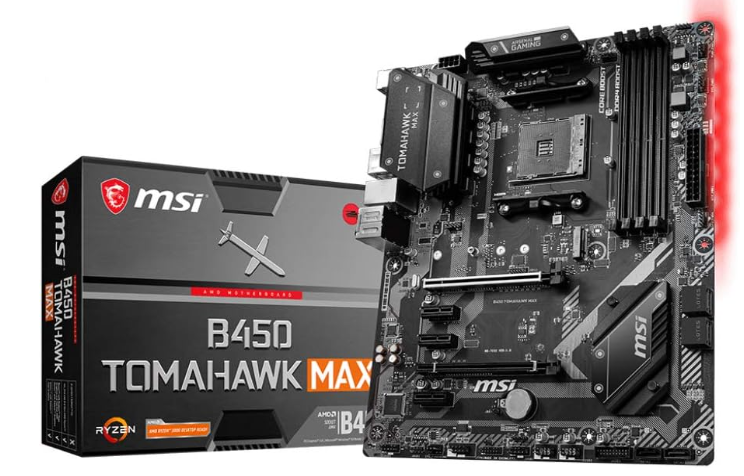
The MSI B450 Tomahawk MAX is one of the most recognizable B450 boards for Ryzen 3000-era systems. It is an ATX motherboard built around AMD’s B450 chipset and AM4 socket.
For the Ryzen 5 3500X, its biggest advantage is balance. You get four DIMM slots, an M.2 slot, six SATA ports, a full-size PCIe x16 slot, multiple expansion slots, and a relatively substantial ATX layout.
MSI specifies support for 1st-, 2nd-, and 3rd-generation Ryzen desktop processors on the board. Its specifications also list support for Ryzen 3000 processors with memory speeds extending beyond DDR4-3200 through A-XMP overclocking, depending on the memory and configuration.
That makes the board particularly suitable for users who want to build a traditional gaming desktop around the Ryzen 5 3500X.
Specifications
| Feature | MSI B450 Tomahawk MAX |
|---|---|
| Socket | AM4 |
| Chipset | AMD B450 |
| CPU Support | Ryzen 1st/2nd/3rd Gen |
| Memory | 4 × DDR4 DIMM |
| Maximum Memory | Up to 64GB on original MAX specification |
| Primary PCIe | PCIe 3.0 x16 |
| M.2 | 1 × M.2 |
| SATA | 6 × SATA 6Gb/s |
| Form Factor | ATX |
| LAN | Gigabit Ethernet |
| Audio | Realtek ALC892 |
| Memory Architecture | Dual Channel |
The board’s storage configuration is especially useful for a gaming PC. MSI lists one CPU-connected M.2 slot supporting PCIe 3.0 x4 storage, along with six SATA 6Gb/s connectors.
That means you can install a fast NVMe SSD for Windows and games while still having plenty of SATA connectivity for additional SSDs or hard drives.
The four memory slots are another advantage. Instead of being restricted to two DIMMs, you can start with a 2 × 8GB configuration and potentially expand later.
The board also includes a full-size ATX layout, which can be easier to work with than compact motherboards when installing a large graphics card, multiple storage drives, or additional expansion hardware.
Who Should Choose It?
The MSI B450 Tomahawk MAX is a strong fit for:
- Ryzen 5 3500X gaming PCs
- Budget and mid-range gaming builds
- Users who want four RAM slots
- Builders needing several SATA drives
- Users who prefer a full-size ATX motherboard
- Systems using a dedicated graphics card
- Buyers who find the board at a good used or remaining-stock price
One important consideration is availability. Because the B450 Tomahawk MAX is an older AM4 motherboard, current pricing and condition can vary significantly. A used board can make sense, but you should inspect its physical condition and verify BIOS support before purchasing.
2. ASUS TUF Gaming B450-PLUS II

The ASUS TUF Gaming B450-PLUS II is another sensible motherboard for the Ryzen 5 3500X. It uses the AM4 socket and AMD B450 chipset and is designed for mainstream Ryzen systems.
Its strongest appeal is its combination of compatibility, ATX expansion, DDR4 support, and TUF Gaming-oriented design.
ASUS’s official CPU support database specifically lists the Ryzen 5 3500X as supported, with the processor validated on the board’s supported BIOS configuration.
That makes CPU compatibility much less of a concern when pairing this board with the Ryzen 5 3500X.
The four DDR4 memory slots give you plenty of flexibility for a dual-channel setup. For a gaming system, 16GB remains a practical starting point, while 32GB provides more breathing room for newer games, multitasking, browsers, and background applications.
The B450 platform also gives you the essential AM4 features needed for the Ryzen 5 3500X, including PCIe connectivity, SATA storage, and M.2-based storage.
Specifications
| Feature | ASUS TUF Gaming B450-PLUS II |
|---|---|
| Socket | AM4 |
| Chipset | AMD B450 |
| CPU Support | Includes Ryzen 5 3500X |
| Memory | DDR4 |
| DIMM Slots | 4 |
| Form Factor | ATX |
| Primary Expansion | PCIe x16 |
| Storage | M.2 + SATA |
| Platform | AM4 |
| Target Use | Gaming / Mainstream Desktop |
One of the most important advantages here is CPU support documentation. ASUS explicitly lists the Ryzen 5 3500X in its supported CPU database, which is particularly useful when purchasing an older AM4 board.
That matters because motherboard BIOS versions can affect processor compatibility.
The ASUS board is also suitable for users who want to build a conventional ATX gaming computer rather than a compact system.
Who Should Choose It?
The ASUS TUF Gaming B450-PLUS II makes sense for:
- Ryzen 5 3500X gaming builds
- Users who prefer ASUS motherboards
- Builders wanting an ATX board
- Users upgrading an older AM4 system
- Gamers using DDR4 memory
- Buyers who find it cheaper than competing B450 boards
If both boards are similarly priced, compare their condition, BIOS version, included accessories, warranty, storage needs, and rear I/O before making a decision.
Feature-by-Feature Comparison Table
Both boards can work well with the Ryzen 5 3500X, but their feature sets and layouts aren’t identical. Here’s a quick comparison of the most important characteristics.
| Feature | MSI B450 Tomahawk MAX | ASUS TUF Gaming B450-PLUS II |
|---|---|---|
| CPU Socket | AM4 | AM4 |
| Chipset | B450 | B450 |
| Ryzen 5 3500X Support | Yes | Yes |
| RAM Slots | 4 | 4 |
| Memory Type | DDR4 | DDR4 |
| Primary PCIe | PCIe 3.0 x16 | PCIe x16 |
| M.2 | 1 | 1 |
| SATA | 6 | Multiple SATA |
| Form Factor | ATX | ATX |
| Dedicated GPU Support | Yes | Yes |
| Overclocking Platform | B450 | B450 |
| Best For | Balanced gaming build | Mainstream gaming build |
The MSI model provides particularly clear storage and expansion specifications, including six SATA ports and one M.2 slot.
The ASUS board’s biggest practical advantage is its clearly documented compatibility with the Ryzen 5 3500X, which is useful when dealing with an older AM4 platform.
Quick Highlights Table
If you don’t want to read every specification, the following table summarizes the main reasons to consider each motherboard.
| Motherboard | Main Strength | Ideal User |
|---|---|---|
| MSI B450 Tomahawk MAX | Balanced features and expansion | Gaming PC builders |
| ASUS TUF Gaming B450-PLUS II | Compatibility and mainstream features | AM4 upgrade/build users |
For a Ryzen 5 3500X system, neither motherboard requires an expensive chipset to deliver the core platform features you need. The key is choosing the board that gives you enough connectivity and reliability at the right price.
Buying Guide: What to Look for when chossing Motherboard for Ryzen 5 3500X
1. AM4 Compatibility
The first thing to check is the socket. The Ryzen 5 3500X requires an AM4 motherboard.
B450 is one of the most straightforward chipset choices because it was designed around the AM4 Ryzen ecosystem.
Always verify the exact CPU support list and BIOS requirements before buying an older motherboard.
2. BIOS Support
BIOS compatibility is particularly important with older AM4 boards.
A motherboard may physically have an AM4 socket but still require a particular BIOS version for a specific Ryzen processor.
When purchasing a used motherboard, ask the seller which CPU was previously installed and whether the BIOS has been updated.
The ASUS CPU support database is useful here because it explicitly documents the Ryzen 5 3500X and its validated BIOS information.
3. VRM and Cooling
The Ryzen 5 3500X isn’t an extremely demanding CPU, but VRM quality still matters.
A motherboard with adequate VRM heatsinks can help maintain stable operation during long gaming sessions and sustained workloads.
You don’t need a premium enthusiast VRM for this processor. Instead, focus on a board with a sensible power-delivery design and proper heatsinks.
4. RAM Support
Look for four DIMM slots if possible.
A 2 × 8GB DDR4 kit is a sensible configuration for a basic gaming system. If your budget allows, 2 × 16GB gives you 32GB and more room for demanding games and multitasking.
Using two memory modules also allows the system to operate in dual-channel mode.
5. M.2 Storage
An M.2 slot makes installing an NVMe SSD much easier.
The MSI B450 Tomahawk MAX includes an M.2 slot supporting PCIe 3.0 x4 with compatible Ryzen processors.
For a Ryzen 5 3500X PC, a good PCIe 3.0 NVMe SSD can provide fast boot times, application loading, and game loading without requiring an expensive modern PCIe 4.0 platform.
6. PCIe Expansion
If you’re installing a dedicated graphics card, make sure the motherboard provides a full-length PCIe x16 slot in a sensible position.
The B450 platform is perfectly capable of supporting the graphics cards commonly paired with a Ryzen 5 3500X.
7. USB Connectivity
Think about the peripherals you use.
Gaming keyboards, mice, controllers, USB headsets, external storage, Wi-Fi adapters, and other accessories can quickly consume USB ports.
Check both rear I/O and internal USB headers before purchasing.
8. Form Factor
Both recommended motherboards use an ATX form factor.
Make sure your PC case supports ATX before buying.
An ATX motherboard gives you more physical room for expansion, but a Micro-ATX board may be preferable if you’re building a smaller system.
Best Pick Based on Your Use Case
For a Traditional Gaming PC
The MSI B450 Tomahawk MAX is a strong match for a conventional Ryzen 5 3500X gaming computer because of its ATX layout, four memory slots, M.2 storage, six SATA ports, and broad Ryzen compatibility.
For an AM4 Upgrade
The ASUS TUF Gaming B450-PLUS II is worth considering when you want a straightforward AM4 upgrade path and its local price is attractive.
Its official CPU support documentation specifically includes the Ryzen 5 3500X.
For Multiple Storage Drives
The MSI board has a particularly useful storage configuration, with one M.2 slot and six SATA 6Gb/s ports.
That makes it practical for users combining an NVMe boot drive with multiple SATA SSDs or hard drives.
For a Budget Build
Don’t automatically buy the cheapest motherboard.
A slightly better board can provide more usable USB ports, better expansion, better cooling, more RAM capacity, and fewer upgrade headaches.
With older hardware like the Ryzen 5 3500X, however, the motherboard should remain proportionate to the overall system budget.
Real-World Performance
The motherboard itself isn’t responsible for creating large FPS differences between otherwise identical Ryzen 5 3500X systems.
If you use the same CPU, graphics card, memory, storage, drivers, and BIOS settings, two competent B450 motherboards should deliver broadly similar gaming performance.
The bigger performance factors are your graphics card, RAM configuration, CPU cooling, game settings, and background applications.
For example, pairing the Ryzen 5 3500X with 16GB of dual-channel DDR4 and a capable dedicated graphics card can create a well-balanced budget gaming system.
Gaming Performance
At 1080p, the graphics card often becomes the primary performance factor depending on the game.
Competitive games that prioritize high frame rates can place more emphasis on CPU performance, while graphically demanding AAA titles often depend more heavily on the GPU.
A good motherboard helps maintain stable operation, but switching between two quality B450 boards should not be expected to suddenly produce a dramatic FPS improvement.
Productivity
The Ryzen 5 3500X has six cores, making it suitable for everyday productivity, web browsing, office applications, light content creation, and multitasking.
The motherboard contributes indirectly by providing enough memory and storage expansion for your workload.
Installing 32GB of RAM, for example, can be more useful for heavy multitasking than spending substantially more money on a premium motherboard.
Storage Performance
Using an NVMe SSD can make the system feel considerably faster than an older mechanical hard drive.
The MSI B450 Tomahawk MAX supports PCIe 3.0 x4 M.2 storage with compatible Ryzen processors.
For a Ryzen 5 3500X system, this is sufficient for a fast everyday computing and gaming experience.
Thermals
Motherboard temperature and CPU temperature depend on multiple factors.
Your CPU cooler, case airflow, ambient temperature, fan configuration, thermal paste, and workload all matter.
The motherboard should have adequate heatsinks around the power-delivery area and should be installed in a case with reasonable airflow.
Safety & Protection
A reliable PC build isn’t only about performance. Proper installation and electrical protection can help prevent unnecessary component failures.
Use a Quality Power Supply
The motherboard cannot compensate for a poor-quality PSU.
Choose a reputable power supply with sufficient wattage for the Ryzen 5 3500X and your graphics card.
Avoid extremely cheap power supplies simply because they have a high wattage printed on the label.
Keep the System Cool
Make sure your case has adequate intake and exhaust airflow.
Dust buildup can restrict airflow and increase temperatures over time.
Clean the case filters, fans, heatsinks, and ventilation areas periodically.
Avoid Aggressive Overclocking
The Ryzen 5 3500X can be used with a B450 overclocking platform, but aggressive voltage and frequency settings can increase heat and power consumption.
For a long-term system, stability should take priority over chasing a small performance increase.
Protect Against Power Problems
A surge protector or UPS can provide additional protection, especially in locations where power fluctuations are common.
A UPS can also provide time to safely shut down your computer during an outage.
Update BIOS Carefully
BIOS updates can improve compatibility and stability, but they should not be interrupted.
Use the correct BIOS file for your exact motherboard model and follow the manufacturer’s instructions.
Long-Term Reliability Tips
Keep BIOS and Drivers Organized
You don’t need to update every component constantly.
However, keep track of important BIOS, chipset, LAN, and audio updates when troubleshooting compatibility or stability problems.
Monitor Temperatures
Occasionally check CPU temperatures under gaming and sustained workloads.
If temperatures suddenly become much higher than usual, inspect the cooler, thermal paste, fan operation, and case airflow.
Keep the M.2 SSD Cool
NVMe drives can become warm during sustained transfers.
Make sure the drive has reasonable airflow and use the motherboard’s M.2 heatsink if your specific board includes one.
Don’t Overload the System
The Ryzen 5 3500X is capable, but it is still an older six-core processor.
Don’t expect it to deliver the same CPU performance as modern Ryzen processors.
Instead, build around its strengths and use appropriately matched components.
Check Used Motherboards Carefully
Because B450 boards are older, many Ryzen 5 3500X buyers will encounter used-market options.
Before buying used, inspect:
- CPU socket condition
- RAM slots
- PCIe slot condition
- M.2 slot
- USB ports
- SATA connectors
- VRM heatsinks
- Capacitors and visible components
- BIOS version
- Included I/O shield
A motherboard that looks inexpensive may not be a good deal if it has damaged ports or an unknown history.
Buying Recommendations
When shopping for the best motherboard for Ryzen 5 3500X, don’t judge the motherboard solely by its original launch price.
Because the processor and B450 motherboards are from an older AM4 generation, today’s buying decision is largely about availability, condition, and value.
The MSI B450 Tomahawk MAX is particularly appealing if you want a well-rounded ATX motherboard with strong storage and expansion options. Its official specification lists four DDR4 slots, one M.2 slot, six SATA connectors, and support for 3rd-generation Ryzen processors.
The ASUS TUF Gaming B450-PLUS II is another practical option, particularly if you find it at a better price or prefer ASUS’s platform. Its official CPU support page specifically lists the Ryzen 5 3500X.
If you’re buying a motherboard today, compare the total platform cost rather than the motherboard alone.
For example, if a B550 motherboard costs only slightly more than an older B450 board, it may be worth investigating the B550 option for newer platform features. However, if you already own the Ryzen 5 3500X, you generally don’t need to spend heavily on a motherboard just to run the processor.
For a used B450 board, condition and BIOS compatibility should be checked before price.
Final Verdict
The Ryzen 5 3500X doesn’t require an expensive motherboard. A quality B450 motherboard provides an appropriate balance of CPU compatibility, DDR4 support, storage, expansion, and gaming features.
The MSI B450 Tomahawk MAX offers a particularly well-rounded feature set for a Ryzen 5 3500X gaming PC. Its four DDR4 slots, M.2 support, six SATA ports, ATX design, and Ryzen 3000 compatibility make it a practical foundation for a traditional desktop.
The ASUS TUF Gaming B450-PLUS II is also a suitable choice, especially when its availability or pricing makes it attractive. ASUS explicitly lists the Ryzen 5 3500X in its supported CPU database, providing useful confirmation for buyers working with the older AM4 platform.
The most important thing is to avoid overspending. Put enough of your budget into the graphics card, memory, SSD, cooling, and power supply while selecting a motherboard that provides the connectivity and reliability you actually need.
FAQs about Motherboard for Ryzen 5 3500X
Q1: What is the best motherboard for Ryzen 5 3500X?
Ans: A quality B450 motherboard is an excellent match for the Ryzen 5 3500X. The MSI B450 Tomahawk MAX and ASUS TUF Gaming B450-PLUS II are two suitable options. Both provide the AM4 platform, DDR4 memory support, PCIe expansion, and storage connectivity required by the processor.
Q2: Does Ryzen 5 3500X support B450 motherboards?
Ans: Yes. The Ryzen 5 3500X is an AM4 processor designed for the Ryzen 3000 generation, and B450 motherboards can support it. Always verify the specific motherboard’s CPU support list and BIOS requirements before purchasing.
Q3: Does the Ryzen 5 3500X need a B550 motherboard?
Ans: No. The Ryzen 5 3500X does not require B550. A compatible B450 motherboard can provide everything needed for a Ryzen 5 3500X system. B550 may be worth considering if you’re buying a newer motherboard and want additional platform features, but it isn’t required for the CPU.
Q4: How much RAM should I use with Ryzen 5 3500X?
Ans: 16GB of DDR4 is a sensible starting point for a gaming PC. A 2 × 8GB dual-channel kit is a common configuration. If you multitask heavily, edit content, or play memory-intensive games, 32GB can provide additional headroom.
Q5: Is B450 good for gaming with Ryzen 5 3500X?
Ans: Yes. A good B450 motherboard can work very well for a Ryzen 5 3500X gaming system. Gaming performance will depend much more heavily on the graphics card, memory configuration, CPU settings, game engine, resolution, and graphics settings than on choosing between two competent B450 motherboards.
Q6: Can Ryzen 5 3500X use an NVMe SSD?
Ans: Yes. Compatible B450 motherboards can provide M.2 NVMe support. For example, the MSI B450 Tomahawk MAX includes an M.2 slot supporting PCIe 3.0 x4 storage with compatible Ryzen processors.
Q7: Is the MSI B450 Tomahawk MAX still worth buying?
Ans: It can be worth buying when available at a sensible price and in good condition. It offers useful features for a Ryzen 5 3500X, including four RAM slots, an M.2 slot, six SATA ports, and an ATX layout. Because it is an older motherboard, check its condition, BIOS support, warranty, and price before purchasing.
Short Conclusion
The best motherboard for Ryzen 5 3500X doesn’t need to be expensive. A dependable B450 motherboard can provide the processor with a solid platform for gaming, everyday computing, and moderate productivity. The MSI B450 Tomahawk MAX and ASUS TUF Gaming B450-PLUS II both offer the essential AM4 and DDR4 features needed for a capable Ryzen 5 3500X build.
Focus on compatibility, BIOS support, VRM cooling, RAM capacity, M.2 storage, expansion slots, and overall price. Most importantly, make sure the motherboard is in good condition if you’re purchasing an older or used AM4 model.