The AMD Ryzen 5 3600X may no longer be the newest Ryzen processor, but it remains a capable 6-core, 12-thread AM4 CPU for budget gaming PCs, everyday productivity systems, and affordable upgrades. With a 3.8 GHz base clock and boost speeds up to 4.4 GHz, the processor still has enough performance for 1080p gaming and a wide range of demanding applications. The biggest challenge today is choosing a motherboard that gives the Ryzen 5 3600X the right balance of power delivery, connectivity, storage support, memory compatibility, and long-term value.
The best motherboard for Ryzen 5 3600X does not necessarily need to be an expensive X570 model. A quality B450 or B550 motherboard can provide more than enough power for this 65W-class processor. B550 is particularly attractive because it brings PCIe 4.0 support from compatible Ryzen 3000 processors, while mature B450 models can be excellent choices when found at a good price. ASUS and MSI both offer strong AM4 options, with models such as the TUF Gaming B550-PLUS and MSI B450 TOMAHAWK MAX offering different approaches to value and features.
For this guide, we will compare three strong choices and explain which one makes the most sense for gaming, budget builds, wireless connectivity, storage expansion, and future upgrades.
Why It Matters to You
A motherboard does not usually produce large FPS gains by itself, but it determines how effectively the rest of your PC can operate. With the Ryzen 5 3600X, motherboard selection matters because you want stable power delivery, compatible DDR4 memory, enough M.2 and SATA connectivity, reliable networking, and a BIOS that supports your processor.
The Ryzen 5 3600X uses the AM4 socket, which means you have a large selection of motherboards from B450, B550, X470, X570, and other AM4 chipsets. However, these platforms are not identical.
A basic B450 board can run a Ryzen 5 3600X perfectly well, provided it has proper CPU support and an appropriate BIOS. The MSI B450 TOMAHAWK MAX, for example, officially supports third-generation Ryzen processors and provides four DDR4 slots, six SATA ports, and an M.2 slot.
A B550 motherboard can be more attractive if you want PCIe 4.0 storage or graphics support, additional M.2 connectivity, and a newer platform design. ASUS lists the TUF Gaming B550-PLUS as supporting Ryzen 3000 desktop processors and PCIe 4.0 connectivity through the CPU.
The important point is that you should not overspend on the motherboard simply because the processor supports overclocking. The 3600X does not require an extreme VRM design to operate normally. A well-built mid-range motherboard can provide plenty of power-delivery headroom.
Instead, consider what you actually need.
If you are building a straightforward gaming PC, prioritize VRM quality, RAM support, one good M.2 slot, a strong primary PCIe slot, and dependable networking. If you want several NVMe drives, Wi-Fi, USB connectivity, or a future AM4 CPU upgrade, spending more on B550 can make sense.
In-Depth Reviews the Best Motherboard for Ryzen 5 3600X

Choosing the best motherboard for Ryzen 5 3600X can improve your PC’s stability, connectivity, storage options, and upgrade flexibility. Quality B450 and B550 motherboards are excellent matches for this six-core processor. For most users, a B550 motherboard offers the best balance of modern features, PCIe 4.0 support, strong power delivery, and long-term value for gaming and productivity.
1. MSI MAG B550 Tomahawk — Best Overall
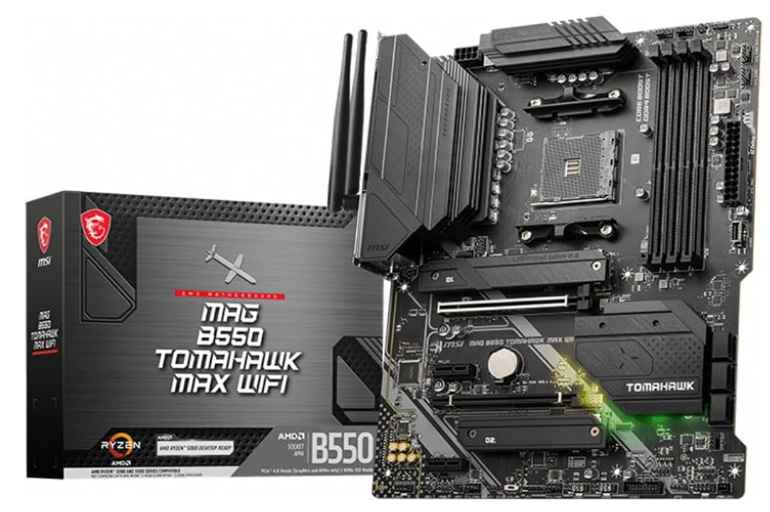
The MSI MAG B550 Tomahawk is one of the strongest overall choices for a Ryzen 5 3600X system when you want a feature-rich motherboard without moving into unnecessarily expensive enthusiast territory.
Its biggest advantage is that the Ryzen 5 3600X is an easy workload for a quality B550 power-delivery system. That means the motherboard can operate comfortably without being pushed hard, while also leaving more flexibility if you eventually move to a more powerful compatible AM4 processor.
B550 is especially appealing because it provides PCIe 4.0 support with compatible Ryzen 3000 processors. That gives the system access to faster PCIe 4.0 NVMe storage and a modern primary expansion interface.
For gaming, this is more about flexibility than immediate FPS gains. A PCIe 4.0 interface does not automatically make your graphics card dramatically faster, but it gives you a newer storage and expansion platform.
The Tomahawk family is also known for emphasizing power delivery and cooling rather than filling the motherboard with unnecessary extras. That makes it particularly attractive for users who want a dependable foundation for a gaming PC.
Why choose it:
- Excellent overall balance
- Strong VRM and VRM cooling
- B550 chipset
- PCIe 4.0 support with compatible Ryzen 3000 CPUs
- Multiple storage possibilities
- Good choice for gaming
- Plenty of upgrade headroom
- Suitable for performance-oriented builds
Best for: Gamers, enthusiasts, and users who want the best all-round motherboard for Ryzen 5 3600X.
The biggest drawback is simple: if you already own a good B450 motherboard, upgrading to B550 may not produce a noticeable gaming performance increase. The benefits are primarily connectivity, PCIe 4.0, expansion, and platform flexibility.
2. ASUS TUF Gaming B550-PLUS — Best for Features and Connectivity
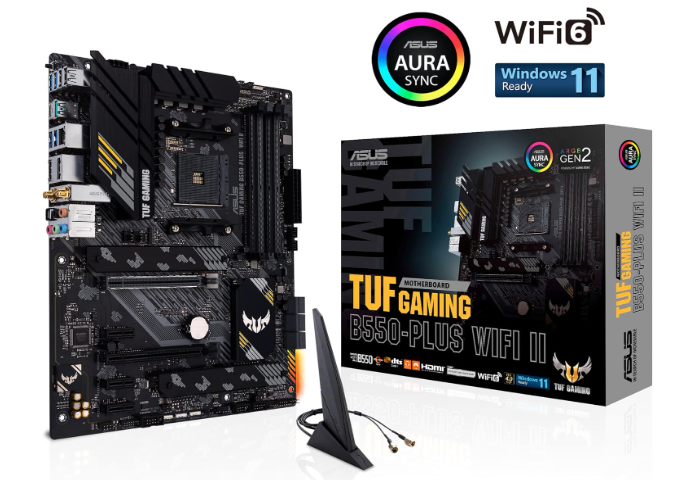
The ASUS TUF Gaming B550-PLUS is another excellent choice for the Ryzen 5 3600X, particularly if you want a durable-feeling motherboard with modern connectivity and a broad feature set.
ASUS specifies support for Ryzen 3000 processors and PCIe 4.0 connectivity on the B550 platform. The board also provides four DDR4 memory slots and support for high-speed DDR4 configurations depending on CPU and memory compatibility.
One of the biggest advantages of this motherboard is its balance. You do not need to buy a premium X570 board to get a strong feature set. B550 already gives the Ryzen 5 3600X access to the key modern features that matter for most gaming PCs.
The TUF Gaming series is also positioned toward durability and dependable everyday operation. For someone building a PC intended to remain in service for several years, that makes the board particularly appealing.
Another reason to consider this motherboard is the availability of a Wi-Fi version. If your PC will be positioned away from your router, integrated wireless networking can simplify the build and eliminate the need for an additional Wi-Fi adapter.
Why choose it:
- Excellent B550 platform
- Ryzen 3000 compatibility
- PCIe 4.0 support
- Four DDR4 memory slots
- Strong feature set
- Good connectivity
- Wi-Fi version available
- Excellent option for gaming and productivity
Best for: Users who want a modern B550 motherboard with a strong combination of connectivity, durability, and features.
Compared with a basic B450 board, it can cost more. But if you are buying a motherboard from scratch rather than upgrading an existing system, the additional features can make the investment worthwhile.
3. MSI B450 TOMAHAWK MAX — Best Budget Choice
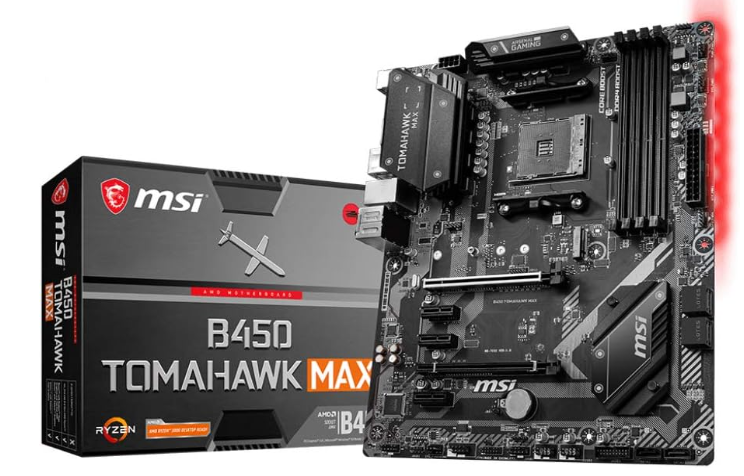
If your priority is getting the most value from an existing Ryzen 5 3600X build, the MSI B450 TOMAHAWK MAX remains a compelling option.
The B450 platform is older than B550, but that does not mean it is unsuitable for the Ryzen 5 3600X. MSI officially lists third-generation Ryzen support for this motherboard and provides four DDR4 slots, up to 64GB according to its specification page, six SATA 6Gb/s ports, and one M.2 slot.
For a conventional gaming PC with one NVMe SSD and one graphics card, those specifications can still be perfectly adequate.
The board’s ATX layout also provides plenty of room for standard components, and its Flash BIOS Button can be useful when updating firmware.
The main limitation is the platform itself. B450 does not provide the same PCIe 4.0 capability offered by B550. Its primary graphics interface and M.2 implementation are based around PCIe 3.0 with a Ryzen 3000 CPU.
That is not necessarily a problem for a Ryzen 5 3600X gaming machine. Most users will not see a dramatic difference in everyday gaming simply because their graphics card is connected through PCIe 3.0 rather than PCIe 4.0.
Why choose it:
- Excellent value when priced competitively
- Proven AM4 platform
- Four DDR4 slots
- Six SATA ports
- M.2 NVMe support
- Good VRM design for the 3600X
- ATX layout
- BIOS Flash Button
Best for: Budget builders and existing AM4 users who want a dependable motherboard without paying for newer B550 features.
One important consideration is availability. Because the B450 TOMAHAWK MAX is an older model, pricing can vary significantly depending on whether you are buying new, old stock, or used hardware.
Feature-by-Feature Comparison Table
The three boards can all work well with the Ryzen 5 3600X, but their strengths are different. B550 models are better suited to users who want PCIe 4.0 and a newer platform, while the B450 TOMAHAWK MAX focuses on affordable AM4 performance.
| Feature | MSI MAG B550 Tomahawk | ASUS TUF Gaming B550-PLUS | MSI B450 TOMAHAWK MAX |
|---|---|---|---|
| CPU Socket | AM4 | AM4 | AM4 |
| Chipset | B550 | B550 | B450 |
| Ryzen 5 3600X | Yes | Yes | Yes |
| Memory | DDR4 | DDR4 | DDR4 |
| Memory Slots | 4 | 4 | 4 |
| PCIe 4.0 | Yes | Yes | No |
| M.2 Support | Multiple | Multiple | 1 |
| SATA | Multiple | Multiple | 6 |
| Wi-Fi | Depends on model | Wi-Fi version available | No |
| Form Factor | ATX | ATX | ATX |
| Best Use | Overall | Features/connectivity | Budget |
| Upgrade Flexibility | Excellent | Excellent | Good |
| Value | Excellent | Excellent | Very good when discounted |
Quick Highlights Table
Here is a faster way to decide which motherboard fits your Ryzen 5 3600X build.
| Motherboard | Best For | Main Advantage | Main Limitation |
|---|---|---|---|
| MSI MAG B550 Tomahawk | Overall | Strong VRM and modern platform | Higher cost than B450 |
| ASUS TUF Gaming B550-PLUS | Features | Connectivity and PCIe 4.0 | Can cost more than budget boards |
| MSI B450 TOMAHAWK MAX | Budget | Excellent AM4 value | PCIe 3.0 platform |
Buying Guide: What to Look for when choosing the Best Motherboard for Ryzen 5 3600X
1. Check AM4 and CPU Compatibility
The first requirement is simple: the motherboard must support the Ryzen 5 3600X.
B450 and B550 are both natural choices. However, older motherboard stock can sometimes require a BIOS update before supporting particular processors. Always check the manufacturer’s CPU support list and BIOS information before purchasing older stock.
2. VRM Quality
VRMs regulate power delivered to the CPU. A strong VRM is valuable for sustained workloads, overclocking, and future processor upgrades.
For a Ryzen 5 3600X, you do not need a huge flagship VRM configuration. However, choosing a motherboard with decent heatsinks and a well-designed power section is preferable to choosing the cheapest board available.
The benefit is not necessarily higher FPS. Instead, good power delivery contributes to stable operation and gives you additional thermal and upgrade headroom.
3. RAM Support
The Ryzen 5 3600X benefits from reasonably fast DDR4 memory.
Look for four DIMM slots if you want the flexibility to expand memory later. Using two matched memory modules is generally preferable to running a single stick because dual-channel memory provides greater memory bandwidth.
A practical starting point is 16GB or 32GB of DDR4, depending on your workload.
4. M.2 Storage
Modern PCs benefit significantly from NVMe SSDs.
If you are building a new system, B550 is attractive because compatible Ryzen 3000 CPUs can provide PCIe 4.0 connectivity. ASUS confirms PCIe 4.0 support for Ryzen 3000 processors on its B550 platform.
However, do not buy a B550 motherboard solely because you expect every SSD to be dramatically faster. The practical difference depends on the drive, workload, and application.
5. PCIe Expansion
Consider what you actually intend to install.
A typical gaming system needs:
- One graphics card
- One or two NVMe SSDs
- Possibly a sound card
- Maybe a Wi-Fi or capture card
A motherboard with sufficient expansion slots will prevent headaches later.
6. Networking
Gigabit Ethernet is sufficient for many home networks, but integrated Wi-Fi can be extremely useful.
If you cannot run an Ethernet cable to your gaming PC, a motherboard with integrated Wi-Fi may be worth the additional cost.
7. USB Connectivity
Count your peripherals before buying.
A gaming setup can quickly require USB ports for a keyboard, mouse, headset, microphone, controller, webcam, external storage, and other accessories.
A motherboard with a well-designed rear I/O panel can make everyday use considerably easier.
8. Form Factor
ATX is the easiest choice if you have a standard mid-tower or full-tower case.
If you are building a compact PC, look for micro-ATX alternatives. Do not buy an ATX motherboard if your case cannot accommodate it.
Best Pick Based on Your Use Case
Best Overall: MSI MAG B550 Tomahawk
For most Ryzen 5 3600X owners, the MSI MAG B550 Tomahawk is the best overall choice.
It offers the right combination of power delivery, connectivity, PCIe 4.0 support, storage flexibility, and upgrade potential.
Best for Connectivity: ASUS TUF Gaming B550-PLUS
Choose the ASUS TUF Gaming B550-PLUS if you value connectivity and want a feature-rich B550 platform. The Wi-Fi version is particularly useful for systems that cannot easily use wired Ethernet.
Best Budget Choice: MSI B450 TOMAHAWK MAX
If you find the B450 TOMAHAWK MAX at a substantially lower price, it can be the smarter value choice.
There is little reason to spend significantly more on B550 if you only need a basic gaming PC with one graphics card and PCIe 3.0 NVMe storage.
Best for a New Build
For a completely new build, I would lean toward B550.
You get a newer platform, PCIe 4.0 support, and more modern expansion possibilities without needing to spend heavily on X570.
Best for an Existing B450 System
If you already own a good B450 motherboard and it is working correctly with the Ryzen 5 3600X, upgrading the motherboard alone usually makes little sense.
Put the money toward a better GPU, larger SSD, more RAM, or a future platform upgrade instead.
Real-World Performance
The motherboard should not be treated like a graphics card or CPU when discussing performance. In most properly configured Ryzen 5 3600X systems, changing between a quality B450 and B550 motherboard will not suddenly transform gaming FPS.
The motherboard’s influence is mostly indirect.
For gaming, the graphics card is normally the biggest performance factor after the CPU. The motherboard’s job is to provide stable CPU power, memory support, PCIe connectivity, storage interfaces, and communication between the components.
With a quality B550 motherboard, the Ryzen 5 3600X can take advantage of PCIe 4.0 connectivity for compatible devices. That can be valuable for high-performance NVMe SSDs and newer expansion hardware.
B450 remains perfectly viable for many gaming configurations. MSI’s B450 TOMAHAWK MAX supports PCIe 3.0 for the primary Ryzen 3000 graphics interface and PCIe 3.0 x4 for its primary M.2 implementation.
Gaming Performance
A Ryzen 5 3600X paired with a capable graphics card can still provide a strong 1080p gaming experience.
The motherboard choice itself should not be expected to produce a major difference in average FPS when comparing two boards with stable power delivery and the same BIOS, RAM, CPU, GPU, and settings.
Instead, the motherboard can affect:
- Memory stability
- CPU boost behavior
- Storage performance
- Expansion capability
- Connectivity
- Upgrade flexibility
Productivity Performance
For applications such as video editing, compression, photo editing, programming, and multitasking, the motherboard’s primary role is again stability and connectivity.
A better motherboard becomes more valuable when you use multiple storage drives, additional expansion cards, high-speed USB devices, or a future higher-end AM4 CPU.
Thermals
A quality VRM heatsink can help maintain reasonable motherboard power-delivery temperatures during sustained CPU workloads.
The Ryzen 5 3600X is not an especially demanding CPU by modern standards, so a good B450 or B550 board should have no trouble handling it under normal conditions.
Safety & Protection
Motherboard safety is not just about preventing catastrophic failure. It also involves maintaining stable operating conditions for the CPU, memory, storage, and other components.
Use a Quality Power Supply
A good motherboard cannot compensate for a poor-quality PSU.
Choose a reputable power supply with enough wattage for the entire system and adequate protection features.
Avoid Excessive Voltage
The Ryzen 5 3600X is unlocked, which means enthusiasts can experiment with tuning. However, aggressive manual voltage settings can increase heat and component stress.
If you are not experienced with CPU overclocking, conservative settings are generally preferable.
Maintain Airflow
Good case airflow helps both CPU and motherboard temperatures.
Use at least one intake and one exhaust fan where practical, and make sure dust does not build up around the CPU cooler and VRM heatsinks.
Update BIOS Carefully
BIOS updates can improve compatibility, stability, and CPU support, but an interrupted BIOS update can create problems.
Use the correct BIOS file for the exact motherboard model and follow the manufacturer’s instructions.
Protect Against Power Problems
If your local electrical supply experiences frequent fluctuations or outages, consider using a UPS.
This is especially useful for gaming PCs and workstations where unexpected shutdowns can damage files or interrupt BIOS and firmware updates.
Long-Term Reliability Tips
A motherboard can last for many years if you keep the surrounding system healthy.
Keep the System Clean
Dust accumulation can increase temperatures and restrict airflow.
Clean the case periodically using appropriate compressed-air cleaning methods while following safe hardware-handling practices.
Monitor Temperatures
Occasionally check CPU, motherboard, and storage temperatures.
You do not need to obsess over temperatures every day, but unusual increases can be an early warning of airflow, cooling, or dust problems.
Use Stable Memory Settings
Fast DDR4 memory can improve Ryzen performance, but unstable memory settings can cause crashes and data corruption.
If you experience random blue screens, application crashes, or boot failures after enabling an XMP/DOCP/A-XMP profile, test the memory at a more conservative setting.
Do Not Overclock Just Because You Can
The 3600X supports tuning, but overclocking is not mandatory.
For a system intended to operate reliably for years, a modest configuration with sensible temperatures can be preferable to an aggressive overclock that produces little real-world benefit.
Keep BIOS and Drivers Reasonably Current
You do not need to update every component every time a new version appears.
However, when a BIOS update specifically improves CPU compatibility, memory stability, security, or an issue affecting your configuration, it may be worth installing.
Plan Storage Expansion
If you expect to add several SSDs, choose a motherboard with enough M.2 and SATA connectivity from the beginning.
The B550 options in this guide are better suited to multi-drive systems than the older B450 TOMAHAWK MAX.
Buying Recommendations
When shopping for the best motherboard for Ryzen 5 3600X, price should be considered alongside features rather than used as the only deciding factor.
If the MSI MAG B550 Tomahawk and ASUS TUF Gaming B550-PLUS are similarly priced, either is a strong choice. Select based on the features you actually need, particularly networking, rear I/O, storage connectivity, and preferred BIOS experience.
If the B450 TOMAHAWK MAX is substantially cheaper, however, it becomes much more attractive.
A useful rule is:
Choose B550 when the price difference is reasonable and you want PCIe 4.0, additional storage flexibility, or a more modern platform.
Choose B450 when you want to minimize spending and your system only needs PCIe 3.0 connectivity.
Do not spend a large portion of your PC budget on an expensive motherboard while pairing it with an entry-level graphics card. For gaming, the GPU usually deserves more of the budget.
For a balanced Ryzen 5 3600X gaming build, prioritize the graphics card, adequate RAM, a quality SSD, and a reliable PSU before spending heavily on motherboard extras.
Final Verdict
The MSI MAG B550 Tomahawk is my overall pick for the best motherboard for Ryzen 5 3600X.
Its combination of strong power delivery, PCIe 4.0 support, modern connectivity, expansion options, and upgrade flexibility makes it an excellent foundation for an AM4 gaming PC.
The ASUS TUF Gaming B550-PLUS is a close alternative and may be the better choice if its connectivity features or Wi-Fi version better match your setup.
For buyers focused on value, the MSI B450 TOMAHAWK MAX remains a sensible option. It supports the Ryzen 5 3600X and offers enough memory, storage, and expansion capability for a conventional gaming PC. Its biggest disadvantage is the older PCIe 3.0 platform.
Ultimately, the best motherboard depends on how you intend to use your Ryzen 5 3600X.
If you want a new and feature-rich AM4 system, buy B550. If you are building as cheaply as possible, a good B450 board can still do the job. And if you already own a working B450 motherboard, there is usually no compelling reason to replace it simply for the sake of moving to B550.
FAQs about the Motherboard for Ryzen 5 3600X
Q1: What is the best motherboard for Ryzen 5 3600X?
Ans: The MSI MAG B550 Tomahawk is an excellent overall choice. It provides strong power delivery, PCIe 4.0 support, good expansion capability, and enough features for gaming and productivity. The ASUS TUF Gaming B550-PLUS is another strong option, while the MSI B450 TOMAHAWK MAX is preferable when budget is the priority.
Q2: Is B550 good for Ryzen 5 3600X?
Ans: Yes. B550 is an excellent match for the Ryzen 5 3600X. It supports Ryzen 3000 processors and provides PCIe 4.0 connectivity with compatible CPUs. This makes B550 particularly attractive for users who want faster PCIe 4.0 NVMe storage and a more modern AM4 platform.
Q3: Can Ryzen 5 3600X run on a B450 motherboard?
Ans: Yes. A compatible B450 motherboard can run the Ryzen 5 3600X. However, older B450 boards may require a BIOS update. The MSI B450 TOMAHAWK MAX is specifically listed by MSI as supporting third-generation Ryzen processors.
Q4: Does Ryzen 5 3600X need an expensive motherboard?
Ans: No. The Ryzen 5 3600X does not require an expensive flagship motherboard. A good-quality B450 or B550 board provides sufficient power delivery for normal operation. Spending more makes sense when you need features such as PCIe 4.0, additional M.2 slots, Wi-Fi, better I/O, or additional upgrade flexibility.
Q5: Is B450 or B550 better for Ryzen 5 3600X?
Ans: B550 is technically the more modern choice because it offers PCIe 4.0 and generally provides newer connectivity options. B450 can still be the better value choice if it is significantly cheaper and your system does not need PCIe 4.0.
Q6: How much RAM should I use with Ryzen 5 3600X?
Ans: 16GB is a reasonable minimum for a gaming-focused system, while 32GB is preferable for heavier multitasking, modern games, content creation, and productivity. Using two matched DDR4 modules is generally preferable to a single memory stick.
Q7: Is Ryzen 5 3600X still good for gaming?
Ans: Yes. The Ryzen 5 3600X remains capable for budget and mid-range gaming systems, especially at 1080p. Its six cores and twelve threads are still useful for gaming and multitasking. However, users building a completely new PC should compare its total platform cost against newer CPUs before investing heavily in an older AM4 system.
Short Conclusion
The Ryzen 5 3600X does not need an extravagant motherboard, but choosing the right AM4 board can make the entire PC more stable, flexible, and upgrade-friendly. For most users, the MSI MAG B550 Tomahawk is the best overall choice thanks to its strong power delivery, PCIe 4.0 support, and modern feature set. The ASUS TUF Gaming B550-PLUS is an excellent alternative for connectivity-focused builds, while the MSI B450 TOMAHAWK MAX remains a great budget option when available at the right price.
For a new Ryzen 5 3600X build, B550 is the safer long-term recommendation. For an inexpensive upgrade or existing AM4 system, a quality B450 motherboard can still deliver excellent results.