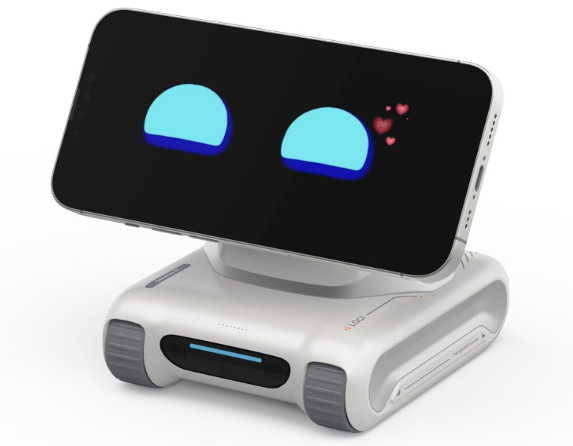
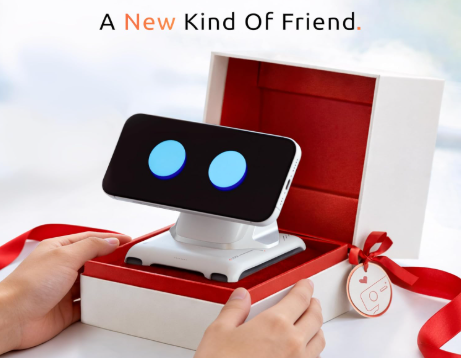
The LOOI Robot takes a different approach to the growing market of AI companions. Instead of putting an expensive processor, display, and camera inside the robot itself, LOOI uses your smartphone as its face, camera, and primary computing platform. The small tracked robot body adds movement, sensors, wireless charging, expressive behavior, and a playful personality, creating a desktop companion that feels more interactive than a traditional AI assistant.
LOOI is designed for people who enjoy AI technology, smart gadgets, robotics, and interactive desk accessories. It can recognize faces and objects, respond to voice commands and gestures, provide practical functions such as weather and reminders, play games, and interact through AI-powered conversations. The current app also advertises GPT-4o integration.
In this LOOI Robot review, we’ll examine its design, specifications, features, compatibility, real-world performance, safety, reliability, and value to help you decide whether this unusual AI companion belongs on your desk.
Why It Matters to You
Most AI assistants are designed around text, voice, or a smart speaker. LOOI attempts to make AI feel more physical.
Instead of asking questions through a stationary speaker, you can have a small robot look toward you, move around your desk, react to gestures, display facial expressions, and respond through your phone’s screen and speakers. That physical interaction is the main reason LOOI stands out.
The concept is particularly interesting for:
- AI and robotics enthusiasts
- Remote workers and students
- People who want an entertaining desk companion
- Families looking for interactive technology
- Gadget collectors
- Users interested in experimenting with computer vision and conversational AI
LOOI also provides practical features including reminders, weather information, tracking-camera functions, motion games, and wireless phone charging.
The important catch is that LOOI is not a completely independent robot. Your smartphone is central to the experience, so phone compatibility and performance matter considerably.
In-Depth Reviews of LOOI Robot
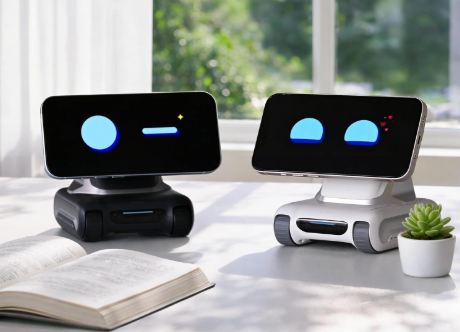
The LOOI Robot is an innovative AI desktop companion that turns your smartphone into an interactive robotic face. With conversational AI, object and gesture recognition, expressive movements, wireless charging, and a playful personality, it offers a unique experience. Its biggest limitation is smartphone dependency, but for AI enthusiasts and gadget lovers, LOOI delivers an engaging and futuristic desk companion.
Design and Build Quality
LOOI has a compact body measuring approximately 110 × 98 × 110 mm and weighs around 385 grams. Its small footprint makes it suitable for a desk without consuming much workspace.
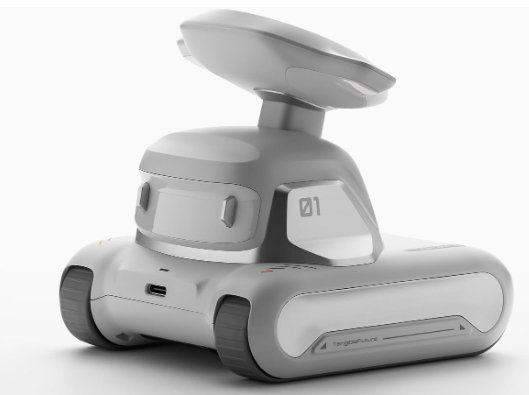
The tracked design gives LOOI a miniature robotic appearance rather than making it look like a conventional phone stand. The robot can move across the desktop while its attached smartphone provides the visual face.
This design is one of LOOI’s biggest advantages. The smartphone screen can display different expressions, while the robot’s movements make those expressions feel more convincing.
Smartphone-as-a-Face Concept
The cleverest part of LOOI is that it doesn’t need its own expensive display.
Your smartphone becomes the robot’s face. Its camera provides visual input, while the phone’s processing hardware handles much of the computational workload.
This approach makes the robot considerably more interesting than a simple phone holder. At the same time, it creates an obvious dependency: if you don’t want to dedicate your phone to LOOI, the experience can become less convenient.
AI and Conversation
LOOI is designed around conversational interaction rather than simple predefined commands. The official app describes GPT-4o integration and a biomimetic behavior system designed to combine perception, decision-making, emotions, and physical responses.
This allows LOOI to behave more like a character than a conventional smart accessory.
It can:
- Answer questions
- Hold conversations
- React to its environment
- Recognize objects
- Respond to gestures
- Display different emotional behaviors
- Remember aspects of interaction
- Provide weather and reminder functions
The personality element is arguably more important than raw AI performance. LOOI is designed to make AI interaction entertaining.
Vision and Gesture Recognition
Because LOOI uses your smartphone’s camera, it can recognize faces, objects, and certain gestures. The official product information also highlights visual awareness and edge/obstacle detection.
This makes the robot more interactive than a stationary chatbot.
However, the quality of these functions naturally depends on the smartphone being used. A faster, newer phone should generally provide a smoother experience than an older or weaker device.
Movement and Desk Navigation
LOOI uses a tracked movement system that allows it to move around a desk.
Its obstacle and cliff-detection capabilities are especially important because a desktop robot without adequate edge detection could easily fall from a table. The official specifications list ToF, obstacle, and cliff sensors.
Movement isn’t the reason to buy LOOI by itself. Instead, it supports the personality and interaction system.
Wireless Charging
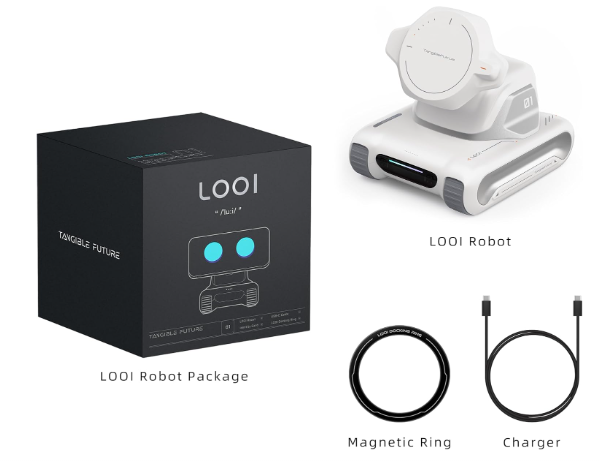
LOOI can also act as a wireless charging platform. The official product page lists 10W maximum wireless output, with MagSafe support for compatible iPhones and a docking ring for devices without built-in magnetic attachment.
This is a useful secondary feature, but I wouldn’t treat LOOI primarily as a wireless charger. Its real value comes from combining charging with robotics and AI interaction.
App and Compatibility
The LOOI app is available for both iOS and Android. The manufacturer recommends iOS 17 or newer and Android 12 or newer, while higher-performance Android hardware is recommended for the best experience.
The manufacturer specifically recommends iPhone 12 or later and compatible Android phones with sufficiently powerful processors. Folding phones and tablets aren’t recommended.
That means checking your phone before purchasing is essential.
Specifications Table
Here are the most important LOOI Robot specifications in an easy-to-read format.
| Specification | LOOI Robot |
|---|---|
| Product Model | L-01 |
| Dimensions | 110 × 98 × 110 mm |
| Weight | 385g |
| Battery | 6000mAh Lithium Polymer |
| Continuous Use | Up to 5 hours |
| Standby | Up to 30 days |
| Wireless Charging | Up to 10W |
| Charging Input | 9V/2A |
| Operating System | iOS / Android |
| Recommended iPhone | iPhone 12 or newer |
| Recommended iOS | iOS 17+ |
| Recommended Android | Android 12+ |
| AI Integration | GPT-4o |
| Sensors | ToF, obstacle and cliff sensors |
| Phone Attachment | Magnetic / Docking Ring |
| Main Use | AI companion, entertainment, assistant |
Key Features at a Glance
- 🤖 AI-powered desktop companion
- 📱 Uses your smartphone as its face and computing platform
- 💬 Conversational AI interaction
- 👀 Facial and object recognition
- ✋ Gesture recognition
- 🛞 Tracked movement
- 🧠 Adaptive personality and behavior
- 🎭 Dynamic emotional expressions
- 📷 Camera-based functions
- ⚡ Up to 10W wireless charging
- 🌡️ Weather and reminder functions
- 🎮 Motion-based games
- 🛡️ Cliff and obstacle detection
- 🔋 6000mAh battery
- 📱 iOS and Android compatibility
What to Look for When Choosing the LOOI Robot
Before buying an AI desktop robot such as LOOI, don’t focus only on how cute or intelligent it looks.
Phone Compatibility
This is the first thing to check. LOOI depends heavily on your smartphone, so an incompatible or underpowered device can limit the experience.
AI Features
Consider whether you actually want conversational AI and computer vision. If you’re only looking for a wireless charger, there are considerably simpler alternatives.
Desk Space
LOOI is compact, but it still needs enough room to move safely. A crowded desk may prevent it from navigating effectively.
Charging Requirements
Check whether your phone supports the required magnetic attachment or whether you’ll need the supplied docking ring.
Privacy
Because LOOI uses your phone’s camera, microphone, and processing capabilities, understand what permissions the app requires before giving it unrestricted access.
Battery
Five hours of continuous use is reasonable for a small desktop robot, but it isn’t designed for uninterrupted all-day autonomous operation.
Quick Highlights Table
This table summarizes the most important advantages and limitations of LOOI.
| Category | Rating | Quick Take |
|---|---|---|
| Design | ⭐⭐⭐⭐⭐ | Cute and distinctive robotic design |
| AI Interaction | ⭐⭐⭐⭐½ | Strong conversational and personality focus |
| Smart Features | ⭐⭐⭐⭐ | Useful assistant and entertainment functions |
| Movement | ⭐⭐⭐⭐ | Fun tracked desktop movement |
| Phone Compatibility | ⭐⭐⭐⭐ | Broad iOS/Android support |
| Battery | ⭐⭐⭐½ | Good for sessions, but not all-day active use |
| Charging | ⭐⭐⭐⭐ | Convenient 10W wireless charging |
| Ease of Use | ⭐⭐⭐⭐ | Straightforward after initial setup |
| Value | ⭐⭐⭐⭐ | Appealing for AI and robotics enthusiasts |
Buying Guide
The biggest question is why you want LOOI.
If you want an AI companion that adds personality to your desk, LOOI makes a lot of sense. Its combination of conversation, movement, expressions, vision, and gestures is considerably more engaging than a conventional AI app.
If you want a standalone robot that works without your smartphone, however, LOOI isn’t the right choice.
You should also consider your phone. Since your smartphone acts as the robot’s face, camera, and computing platform, the quality of your phone directly influences the overall experience.
For iPhone users, the iPhone 12 and newer generation is the manufacturer’s recommended starting point. Android users should pay particular attention to processor requirements.
Pros & Cons of LOOI Robot
The following pros and cons summarize our LOOI Robot review and give you a quick overview of what makes this AI desktop companion appealing—and where it falls short.
Pros
- Excellent personality-driven design
- Smartphone-as-face concept is clever
- Conversational AI makes interaction engaging
- Face, object, and gesture recognition
- Tracked movement adds physical interaction
- 10W wireless charging
- 6000mAh battery
- Cliff and obstacle detection
- iOS and Android support
- Compact desktop-friendly design
Cons
- Requires a compatible smartphone
- Not a fully independent robot
- Heavy use depends on phone performance
- Phone attachment can be inconvenient
- Five-hour active battery life isn’t exceptional
- Some AI interactions can feel less immediate than traditional voice assistants
- A crowded or unsuitable desk can limit movement
Best Pick Based on Your Use Case
Best for AI Enthusiasts
LOOI is an excellent choice. Its conversational AI, computer vision, personality, and physical movement create a much more interactive experience than a standard chatbot.
Best for Remote Workers
LOOI can make a home office feel more lively. Weather information, reminders, conversation, and small entertainment features provide useful breaks throughout the day.
Best for Families
Its expressive personality and games can make it appealing to children and adults. However, parents should review app permissions and privacy settings before allowing children to use it extensively.
Best for Gadget Collectors
This is arguably where LOOI shines most. The smartphone-powered robot concept is unusual, visually interesting, and different from ordinary smart-home gadgets.
Best for People Wanting a Standalone Robot
Not recommended. LOOI’s design depends heavily on your smartphone, so users wanting a completely independent robot should consider another category of product.
Real-World Performance
LOOI’s performance is strongly connected to the smartphone attached to it.
On a capable phone, the combination of camera input, AI processing, animation, and movement can produce an impressive interactive experience. Independent hands-on reports have highlighted its face tracking, gesture recognition, object recognition, and desk navigation as notable parts of the experience.
The physical movement is deliberately more playful than fast. That’s appropriate for a desktop companion because rapid movement would increase the risk of knocking objects over.
The biggest practical limitation is that LOOI isn’t simply an autonomous robot. Your phone is doing a substantial amount of the work. That means performance can vary depending on the phone’s processor, camera, available resources, battery condition, and app version.
Long AI and computer-vision sessions may also place additional workload on the phone. This is something to keep in mind if you’re using your primary phone rather than a spare device.
Safety & Protection
Safety is particularly important with a moving desktop robot.
LOOI includes sensors intended to detect obstacles and table edges, helping reduce the risk of falling from a desk.
For the safest experience:
- Place LOOI on a stable, reasonably flat surface.
- Keep liquids away from the robot.
- Avoid placing cables directly in its path.
- Keep the desk edge clear.
- Don’t rely entirely on automatic edge detection.
- Use the recommended charging setup.
- Don’t obstruct its sensors.
- Keep children from pulling or forcibly moving the robot.
- Make sure the phone is securely attached before allowing movement.
Also remember that the phone is part of the robot. A loose magnetic connection could result in the phone falling if the robot moves unexpectedly.
Long-Term Reliability Tips
To get the most from LOOI over several years, maintenance matters.
Keep the Sensors Clean
Dust and fingerprints can interfere with cameras and sensors. Clean them gently with an appropriate microfiber cloth.
Keep the App Updated
LOOI’s behavior and features depend heavily on its software. Updates can improve functionality and fix bugs.
Don’t Abuse the Battery
Avoid unnecessarily running the robot continuously when it isn’t needed. Lithium-polymer batteries naturally degrade over time, so sensible charging habits can help maintain long-term performance.
Protect the Smartphone
If you’re using LOOI with your main phone, use a secure magnetic connection and avoid placing the robot near desk edges.
Give It Room
A clean navigation area reduces the chances of collisions and improves the experience.
Use a Suitable Phone
If your phone barely meets the minimum requirements, upgrading the phone—or using a more capable spare device—can make LOOI more enjoyable.
Buying Recommendations
LOOI makes the most sense when you think of it as three products combined into one experience: an AI companion, a small mobile robot, and a smartphone charging dock.
If you’re fascinated by AI, robotics, and interactive gadgets, it offers something genuinely different. The smartphone-powered architecture is particularly clever because it avoids putting all the expensive computing hardware into the robot itself.
However, don’t buy LOOI simply because you want a phone charger. Its real purpose is the interactive experience.
Before purchasing, verify that your smartphone meets the recommended requirements, especially if you’re an Android user. Also consider whether you’re comfortable having your phone attached to the robot during use.
Final Verdict
The LOOI Robot is one of the more interesting AI desktop companions because it doesn’t try to compete with smartphones—it uses them.
Its combination of conversational AI, computer vision, physical movement, expressive animations, gesture recognition, and wireless charging makes it much more than a conventional phone dock. The small tracked body gives the AI a physical presence that traditional assistants simply don’t have.
The biggest weakness is also its defining characteristic: you need a compatible smartphone. LOOI’s capabilities are closely tied to the phone’s hardware, software, camera, and battery.
Overall, LOOI is best viewed as an interactive AI companion rather than a serious productivity robot. If you enjoy experimenting with emerging technology and want a fun character sitting on your desk, it’s a compelling choice.
Our verdict: 4.3/5
FAQs about LOOI Robot
Q1: What is the LOOI Robot?
Ans: LOOI is a small AI-powered desktop robot that uses your smartphone as its face, camera, and primary computing platform. It adds movement, sensors, expressive behavior, conversational AI, and wireless charging to create an interactive desktop companion.
Q2: Does LOOI work without a smartphone?
Ans: No. A compatible smartphone is a fundamental part of the LOOI experience. The phone provides the display, camera, and much of the processing required by the robot.
Q3: What phones are compatible with LOOI?
Ans: The manufacturer recommends iPhone 12 or newer models running iOS 17 or later. Android phones require Android 12 or newer, with more powerful hardware recommended for the best experience.
Q4: Does LOOI use ChatGPT?
Ans: Yes. The current LOOI app advertises integration with GPT-4o for its AI experience.
Q5: How long does the LOOI battery last?
Ans: LOOI has a 6000mAh battery rated for up to approximately five hours of continuous use and up to 30 days of standby time.
Q6: Can LOOI charge a smartphone?
Ans: Yes. LOOI supports up to 10W wireless charging. Compatible MagSafe iPhones can attach magnetically, while other supported phones can use the included docking ring.
Q7: Is the LOOI Robot worth buying?
Ans: LOOI is worth considering if you want an interactive AI companion with personality, movement, and computer vision. It is less appealing if you want a standalone robot or only need a wireless charger.
Short Conclusion
The LOOI Robot successfully turns an ordinary smartphone into something that feels surprisingly alive. Its expressive personality, AI conversation, vision features, movement, and wireless charging make it a unique desk companion. While smartphone dependence and active battery life are important limitations, LOOI remains an appealing choice for technology enthusiasts who want to experience AI in a more physical and entertaining way.