Finding the best racing wheel for Xbox One can completely change the way you experience racing games. A standard Xbox controller is convenient, but a dedicated racing wheel gives you a much more natural way to steer, brake, accelerate, and react to the road. Whether you’re spending hours in Forza Horizon 5, competing in F1 24, drifting in CarX Drift Racing Online, or exploring realistic simulations such as Assetto Corsa, the right wheel can make driving feel significantly more immersive.
The challenge is that Xbox One-compatible racing wheels come in very different designs and price ranges. Some prioritize realistic force feedback, while others focus on affordability and simple plug-and-play operation. Pedal quality, steering rotation, button layout, mounting stability, and game compatibility can also make a major difference.
For most Xbox One players, the Logitech G923 is an excellent all-around choice because it combines strong construction, three pedals, 900-degree rotation, and force-feedback technology. The Thrustmaster TMX Pro is another excellent option for players who want responsive force feedback and a more traditional racing setup. Meanwhile, the HORI Racing Wheel Overdrive is worth considering if you want a simpler and more affordable Xbox One racing wheel.
In this guide, we’ll compare these three options and explain which one makes the most sense for casual racing, competitive driving, simulation, and budget-conscious gaming.
Why it Matters to You
Choosing the right racing wheel isn’t simply about buying the most expensive model you can find. Your choice affects immersion, control, comfort, game compatibility, and even how much you enjoy using the setup over the long term.
A good racing wheel can provide several advantages over a controller.
More natural steering: A circular wheel allows much finer steering adjustments than an analog stick. This is particularly useful when taking long corners or making small corrections at high speed.
Better immersion: Force feedback can communicate road surfaces, curbs, collisions, tire grip, and steering resistance. Instead of simply seeing what the car is doing, you can physically feel changes through the wheel.
More precise throttle control: Separate pedals give your right foot much greater control over acceleration and braking than a controller trigger.
Improved racing consistency: Once you become comfortable with a wheel, maintaining smooth steering inputs can become easier, especially in simulation-focused games.
More realistic driving: A 900-degree wheel can allow multiple rotations from lock to lock, providing a more authentic driving experience than a gamepad.
Compatibility is equally important. Not every wheel works with every Xbox game, even if the wheel itself is Xbox-compatible. Official game compatibility lists can vary, and some games may support steering while limiting certain buttons or functions. For example, HORI maintains a game compatibility list for its Xbox racing wheels, while Thrustmaster provides a specific Xbox One game list for the TMX series.
In-Depth Reviews: The Best Racing Wheel for Xbox One
1. Logitech G923 — Best Overall Racing Wheel for Xbox One
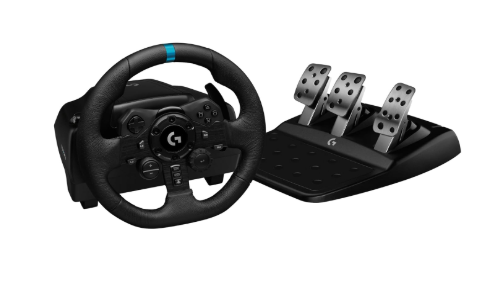
The Logitech G923 is one of the safest choices for Xbox One gamers who want a serious racing setup without moving into expensive professional-level hardware.
Its biggest advantage is balance. You get a 900-degree steering range, force feedback, a three-pedal set, Xbox compatibility, and a sturdy wheel design. Current Xbox racing-wheel recommendations continue to position the G923 as a strong all-around option.
The wheel uses Logitech’s TRUEFORCE technology to add detailed feedback in supported games. Instead of the steering feeling completely disconnected from the road, the wheel can communicate changes in traction and road conditions through physical feedback.
The 900-degree rotation is particularly useful for simulation games. It provides enough range for smooth cornering while still allowing quick steering inputs when required.
The included three-pedal system is another advantage. Having separate accelerator, brake, and clutch pedals gives you more control if you want to experiment with manual transmission and more realistic driving techniques.
The build quality is also impressive for a mainstream console racing wheel. The wheel feels substantial, and the pedal unit is more capable than the basic two-pedal systems commonly found on inexpensive racing wheels.
Pros
- 900-degree steering rotation
- TRUEFORCE force feedback
- Three-pedal setup
- Strong overall build quality
- Xbox One and Xbox Series X|S compatibility
- Excellent for both casual and simulation racing
- Good choice for long-term ownership
Cons
- Brake pedal can feel relatively stiff
- Not as powerful as direct-drive wheels
- Can be more expensive than entry-level wheels
- TRUEFORCE benefits depend on game support
Best for: Gamers who want one dependable Xbox racing wheel that can handle everything from arcade-style driving to more serious simulation.
2. Thrustmaster TMX Pro — Best for Force-Feedback Racing
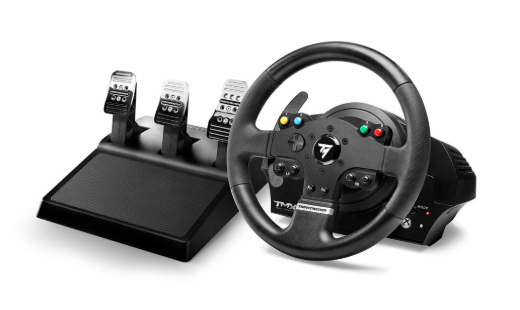
The Thrustmaster TMX Pro is an excellent alternative to the Logitech G923, especially for players who place a high value on force-feedback behavior and customization.
The TMX Pro is specifically designed for Xbox One and Xbox Series X|S, with Thrustmaster maintaining an official compatibility list covering games such as Forza Motorsport, Forza Horizon 4, Forza Horizon 5, F1 23, F1 24, DiRT Rally 2.0, GRID Legends, WRC, SnowRunner, and many others.
This broad compatibility makes the TMX Pro particularly attractive to players who don’t stick to just one racing franchise.
The wheel’s force feedback gives you physical resistance while driving. This can make cornering feel more natural because you’re not simply moving the wheel freely—you are responding to forces generated by the game.
The TMX Pro also has a strong appeal for users who want to grow into sim racing. It provides a more serious foundation than many inexpensive wheels, while remaining considerably more accessible than high-end direct-drive systems.
One important consideration is that game-specific compatibility still matters. Even when the wheel is officially supported by Xbox, individual games can implement wheel support differently. Thrustmaster’s own compatibility information demonstrates why checking your favorite games before purchasing is worthwhile.
Pros
- Strong force-feedback experience
- Xbox One and Xbox Series X|S support
- Good game compatibility
- Suitable for simulation and arcade racing
- Good choice for Forza and F1 players
- Pro pedal configuration
- Excellent alternative to Logitech
Cons
- Older design compared with newer wheel generations
- Some games require manual settings adjustments
- Pedal feel may not satisfy serious sim racers
- No direct-drive torque
Best for: Xbox racers who prioritize force feedback and want a wheel that works across a broad range of racing and simulation games.
3. HORI Racing Wheel Overdrive — Best Budget Choice

If you want the racing-wheel experience without spending as much money, the HORI Racing Wheel Overdrive is one of the options worth considering.
The main advantage of the HORI is simplicity. It is designed specifically for Xbox platforms and provides a larger steering wheel experience than a standard controller without requiring the investment associated with more advanced force-feedback hardware.
However, there is an important distinction: this is primarily a budget-oriented racing wheel rather than a direct competitor to premium force-feedback models.
That means it makes the most sense for casual players, younger gamers, arcade racers, or anyone who wants a physical wheel for games such as Forza Horizon without necessarily demanding realistic force feedback.
HORI also provides an Xbox compatibility list showing support across numerous titles, including DiRT 4, DiRT 5, DiRT Rally, DiRT Rally 2.0, Project CARS, Project CARS 2, Project CARS 3, CarX Drift Racing Online, F1, NASCAR Heat, and others. However, the list also demonstrates that some games may work only in controller/pad mode or have limitations.
That’s an important reminder: budget wheels can be excellent for casual use, but you should verify compatibility with the exact games you play.
Pros
- More affordable than premium racing wheels
- Xbox One compatible
- Simple setup
- Good for casual racing
- Suitable for arcade-style racing
- Convenient button layout
- Good entry point into wheel gaming
Cons
- Limited compared with force-feedback wheels
- Less realistic driving feel
- Pedals are more basic
- Not the best choice for serious simulation
- Game compatibility can vary
Best for: Budget-conscious Xbox One players who want a physical racing wheel mainly for casual and arcade racing.
Feature-by-Feature Comparison Table
Before choosing a wheel, it’s useful to compare the features that have the biggest impact on everyday racing.
| Feature | Logitech G923 | Thrustmaster TMX Pro | HORI Racing Wheel Overdrive |
|---|---|---|---|
| Xbox One | Yes | Yes | Yes |
| Xbox Series X|S | Yes | Yes | Yes |
| PC | Yes | Yes | Limited/varies |
| Force Feedback | Yes | Yes | No |
| Steering Rotation | 900° | Up to 900° | Adjustable |
| Pedals | 3 | 3 | 2 |
| Clutch | Yes | Yes | No |
| Build Quality | Excellent | Very Good | Good |
| Immersion | Excellent | Excellent | Moderate |
| Simulation | Excellent | Excellent | Basic |
| Casual Racing | Excellent | Excellent | Excellent |
| Competitive Racing | Very Good | Very Good | Good |
| Beginner Friendly | Yes | Yes | Excellent |
| Best Feature | TRUEFORCE | Force feedback | Affordable entry |
| Ideal User | All-round racer | Sim-focused racer | Casual gamer |
Quick Highlights Table
If you want a quick answer without reading the entire comparison, here’s how the three wheels stack up.
| Category | Winner | Why |
|---|---|---|
| Best Overall | Logitech G923 | Excellent balance of features and build quality |
| Best Force Feedback | Thrustmaster TMX Pro | Strong and versatile feedback |
| Best Budget | HORI Racing Wheel Overdrive | Affordable and simple |
| Best for Simulation | Logitech G923 | 900° rotation and three pedals |
| Best for Forza | G923 / TMX Pro | Strong Xbox compatibility |
| Best for Beginners | HORI | Simple and accessible |
| Best Long-Term Choice | Logitech G923 | Strong ecosystem and construction |
| Best Alternative | TMX Pro | Excellent force-feedback experience |
Buying Guide: What to Look for
1. Xbox Compatibility
This should be your first consideration.
Don’t assume that every racing wheel with a USB connection will work with Xbox One. Console compatibility is different from PC compatibility. Even Xbox-compatible wheels can have game-specific limitations.
Before purchasing, check both the wheel manufacturer’s compatibility information and the game’s supported-wheel list.
2. Force Feedback
Force feedback is one of the biggest differences between inexpensive and more serious racing wheels.
A wheel without force feedback primarily acts as a steering input device. A force-feedback wheel can push back against your steering and provide physical information about the virtual car.
For racing simulations, force feedback is highly desirable.
If you primarily play arcade racers and don’t care about realism, you can save money by choosing a simpler wheel.
3. Steering Rotation
Steering rotation describes how far the wheel can turn from one side to the other.
A wheel with around 900 degrees of rotation is particularly useful for realistic driving because it allows larger steering movements.
For arcade games, extremely wide rotation isn’t always necessary. For simulation games, however, it can make the experience much more natural.
4. Pedal Quality
Don’t overlook the pedals.
A racing wheel may have an excellent wheel base but mediocre pedals. Separate accelerator, brake, and clutch pedals can significantly improve the experience.
The G923 and TMX Pro are particularly attractive here because both provide three-pedal configurations.
5. Mounting System
A wheel is only useful if it stays firmly attached while you’re driving.
Look for strong clamps or mounting points. A wheel that moves around your desk during aggressive steering inputs will quickly become frustrating.
If you plan to race frequently, a dedicated wheel stand or racing cockpit can be a worthwhile upgrade.
6. Button Layout
Xbox racing games often require more buttons than you might expect.
Look for easy access to menu controls, view changes, gear shifting, and other functions. A good button layout means you don’t constantly need to reach for your controller.
7. Game Compatibility
Compatibility is perhaps the most overlooked issue.
For example, official compatibility information for the HORI Racing Wheel shows that some Xbox games support steering mode while others may only support pad mode.
Similarly, Thrustmaster lists individual Xbox One games that support the TMX.
Always check compatibility for the games you actually play.
Best Pick Based on Your Use Case
Best Overall: Logitech G923
Choose the G923 if you want one wheel that does almost everything well.
It offers excellent construction, force feedback, 900-degree rotation, and three pedals. It is especially suitable for players who want to move between Forza Horizon, Forza Motorsport, F1, rally games, and simulation titles.
Best for Force Feedback: Thrustmaster TMX Pro
Choose the TMX Pro if force feedback is your biggest priority.
It’s an excellent fit for players who want more physical feedback from the road and plan to spend significant time in racing simulations.
Best Budget: HORI Racing Wheel Overdrive
Choose the HORI if you’re mainly looking for a more immersive alternative to an Xbox controller without spending heavily.
It’s particularly suitable for casual racers and arcade-focused players.
Best for Beginners: HORI Racing Wheel Overdrive
New wheel users don’t necessarily need an advanced setup.
The HORI is easier to justify for someone who isn’t sure whether they will enjoy racing with a wheel.
Best for Serious Xbox Racing: Logitech G923 or TMX Pro
If you expect to spend hundreds of hours racing, the additional investment in a force-feedback wheel is worthwhile.
Between these two, the choice largely comes down to personal preference regarding wheel feel, pedals, software, and game compatibility.
Real-World Performance
In real-world use, the biggest difference between a racing wheel and an Xbox controller is not necessarily raw speed—it’s control.
With a controller, steering is handled through a small analog stick. You can make fast adjustments, but the movement is relatively short.
A wheel gives you much greater physical movement.
When approaching a long corner, you can gradually rotate the wheel rather than making tiny thumb movements. As you exit the corner, you can unwind the wheel naturally.
Force feedback adds another layer.
When the front tires begin losing grip, the steering behavior can change. Curbs can produce physical feedback. Road surfaces can create additional vibration or resistance. The result is a driving experience that feels much more interactive.
The G923’s TRUEFORCE system is particularly interesting for supported games because it is designed to provide more detailed physical feedback than conventional force feedback.
The TMX Pro is similarly effective for players who want force-feedback immersion across a wide range of Xbox racing titles. Thrustmaster’s official compatibility list includes many major racing franchises, making it a versatile choice.
The HORI provides a different experience. Without the same level of force feedback, it doesn’t communicate road behavior as convincingly. However, it still offers a more natural steering motion than a controller.
For casual Forza Horizon sessions, that may be more than enough.
Safety & Protection
Racing wheels are generally safe gaming peripherals, but there are a few practical considerations.
Secure the Wheel
Make sure the wheel is firmly mounted before starting a race. A loose wheel can slide or rotate unexpectedly during aggressive steering.
Keep Cables Organized
USB and power cables should be routed away from your feet and chair. Loose cables can become a tripping hazard.
Give the Wheel Space
Make sure you have enough room to rotate the wheel without hitting monitors, furniture, or other objects.
Don’t Force the Wheel
Force-feedback wheels can generate resistance. If the wheel is fighting your steering input, don’t try to overpower it unnecessarily.
Secure the Pedals
Pedals can slide across smooth floors during hard braking. Use a non-slip mat, carpet, or dedicated stand to keep the pedal unit stable.
Take Breaks
Long racing sessions can place repetitive stress on your wrists, arms, shoulders, and legs. Maintain a comfortable posture and take regular breaks.
Long-Term Reliability Tips
A racing wheel can last for years if you take care of it.
Keep Dust Away
Dust can accumulate around buttons, pedals, and moving parts. Periodically clean the wheel using a soft, dry cloth.
Don’t Spill Liquids
Keep drinks away from the wheel base and pedal electronics.
Avoid Excessive Force
You don’t need to aggressively pull or push the wheel to make it work. Let the force-feedback system do its job.
Check Connections
If the wheel starts disconnecting, check the USB and power connections before assuming there is a hardware problem.
Keep Firmware Updated
When supported, firmware updates can improve compatibility and correct bugs.
Thrustmaster, for example, continues to provide drivers and firmware information for the TMX family.
Store It Properly
If you don’t use the wheel regularly, protect it from excessive dust and humidity.
Avoid placing heavy objects on top of the wheel or pedals.
Don’t Ignore Strange Noises
Unusual grinding, clicking, or repeated disconnection can indicate a developing hardware problem. Investigate early rather than continuing to use the wheel until the issue becomes worse.
Buying Recommendations
For most Xbox One gamers, the Logitech G923 is the easiest recommendation.
It combines the features that matter most: strong construction, force feedback, 900-degree rotation, three pedals, and broad Xbox compatibility. It is also versatile enough to grow with you as your interest in racing becomes more serious.
The Thrustmaster TMX Pro is the better alternative if you prefer its force-feedback characteristics or already use other Thrustmaster equipment. Its broad Xbox game compatibility also makes it appealing to players who regularly switch between racing franchises.
The HORI Racing Wheel Overdrive makes the most sense when price and simplicity matter more than simulation realism.
If you’re buying your first racing wheel and aren’t sure whether you’ll use it regularly, the HORI can be an accessible starting point. If you already know that racing wheels are going to become a major part of your gaming setup, spending more on the G923 or TMX Pro is likely to provide a much better long-term experience.
One final recommendation is to consider your entire setup.
A great wheel can still feel disappointing if the pedals slide around, the wheel isn’t mounted securely, or you’re sitting in an uncomfortable position. Even an inexpensive wheel can become much more enjoyable when paired with a stable mounting surface.
Final Verdict
The Logitech G923 is the best racing wheel for Xbox One for most gamers.
Its combination of 900-degree rotation, force feedback, three pedals, strong construction, and Xbox compatibility gives it an excellent balance between realism and usability. Current Xbox racing-wheel roundups also continue to identify the G923 as a leading overall choice.
The Thrustmaster TMX Pro is a close competitor and may be the better choice for players who particularly value force feedback and want broad compatibility across racing and simulation games.
The HORI Racing Wheel Overdrive takes a different approach. It’s not designed to compete with premium force-feedback wheels, but it can be an excellent choice for casual gamers who want physical steering without spending as much.
Ultimately, your ideal wheel depends on how you race.
If you want the best all-around experience, get the G923.
If you want strong force-feedback racing, consider the TMX Pro.
If you want an affordable entry point, choose the HORI Racing Wheel Overdrive.
For most Xbox One owners who are serious about improving their racing experience, however, the Logitech G923 remains the strongest overall recommendation.
FAQ Section
Q1: What is the best racing wheel for Xbox One?
Ans: The Logitech G923 is the best overall racing wheel for Xbox One for most users. It combines 900-degree rotation, force feedback, three pedals, strong construction, and broad Xbox compatibility.
Q2: Does the Logitech G923 work with Xbox One?
Ans: Yes. The Xbox version of the Logitech G923 is compatible with Xbox One as well as Xbox Series X|S and PC. Make sure you purchase the Xbox-compatible version rather than a PlayStation-only version.
Q3: Is the Thrustmaster TMX Pro good for Xbox One?
Ans: Yes. The TMX Pro is an excellent Xbox One racing wheel, particularly for players who want force feedback. Thrustmaster lists numerous compatible Xbox One racing games, including Forza, F1, DiRT, GRID, WRC, and other racing franchises.
Q4: Is a racing wheel better than an Xbox controller?
Ans: For racing games, a wheel can provide more precise and natural steering, especially in simulation-focused titles. However, controllers can still be faster and more convenient for arcade racing or games with limited wheel support.
Q5: Is force feedback important on an Xbox racing wheel?
Ans: Yes, particularly if you play simulation games. Force feedback allows you to feel steering resistance, road surfaces, curbs, traction changes, and other driving effects. For casual arcade racing, it is less essential.
Q6: Is the HORI Racing Wheel Overdrive good for beginners?
Ans: Yes. The HORI Racing Wheel Overdrive is a reasonable beginner option because it provides a physical steering wheel experience without the cost of a more advanced force-feedback setup. It is best suited to casual and arcade-style racing.
Q7: Can I use an Xbox racing wheel on every Xbox One racing game?
Ans: No. Wheel compatibility depends on the individual game. Some titles fully support steering, pedals, buttons, and force feedback, while others may provide partial functionality or no steering-wheel support. Always check the manufacturer’s compatibility list for your specific game. HORI and Thrustmaster both publish game compatibility information for their Xbox wheels.
Short Conclusion
The best racing wheel for Xbox One should give you a combination of realistic steering, reliable pedals, good game compatibility, comfortable controls, and dependable construction. For most players, the Logitech G923 offers the best overall package, while the Thrustmaster TMX Pro is an excellent force-feedback alternative. The HORI Racing Wheel Overdrive is the better choice for gamers who want an affordable and simple introduction to wheel-based racing.
Before buying, focus on the games you actually play, the importance of force feedback, your available desk or cockpit space, and your budget. Choose the wheel that matches your racing habits rather than simply buying the most expensive model. With the right setup, Xbox One racing can become far more immersive, precise, and enjoyable than playing with a standard controller.